
floow.design vs AIDesigner for mobile app screens
AIDesigner covers UI, brand and visual assets, and its paid plan is built around publishing websites and connecting domains. floow.design draws iOS and Android app screens and exports them as native mobile code. This page compares the two on mobile output, with pricing read off AIDesigner's live page.
The short answer
Read AIDesigner's own feature list and the answer is fairly clear: publish unlimited websites, connect your own domains, unlimited watermark-free WebGL effects and backgrounds. That is a web product with a strong visual-asset side, and it is good at that. floow.design does not publish websites, has no domain hosting and no WebGL backgrounds — it draws app screens and exports them to Flutter, React Native, SwiftUI and Jetpack Compose. If you need a site live on your own domain, AIDesigner. If you need phone screens a mobile team can build, floow.design.
Where floow.design is stronger
- Mobile-only. Safe areas, the Dynamic Island, notch insets and platform navigation applied per screen rather than requested.
- Native mobile code export — Flutter, React Native, SwiftUI and Jetpack Compose.
- Far more volume per pound at the same rough price point: $17.49 for roughly 160 screens against 100 credits at $25.
- Screens animate and export as video.
- An MCP server with fourteen tools on Pro and Team.
- Thirty free design tools with no sign-up wall.
What AIDesigner does better
- A free tier, so you can judge it before paying.
- Publishing is included: unlimited websites and your own domains, which floow.design does not do at all.
- Unlimited watermark-free WebGL effects and backgrounds — a genuinely distinctive visual capability.
- Advanced image tools and brand asset generation sit in the same subscription.
- Credit rollovers, so an unused allowance is not lost.
- A single paid tier with a credit selector, which is simpler to reason about than a four-plan ladder.
AIDesigner pricing
Free
$0
Not published
Referenced on the pricing page as the base every paid feature builds on. Limits are not published on that page.
Pro
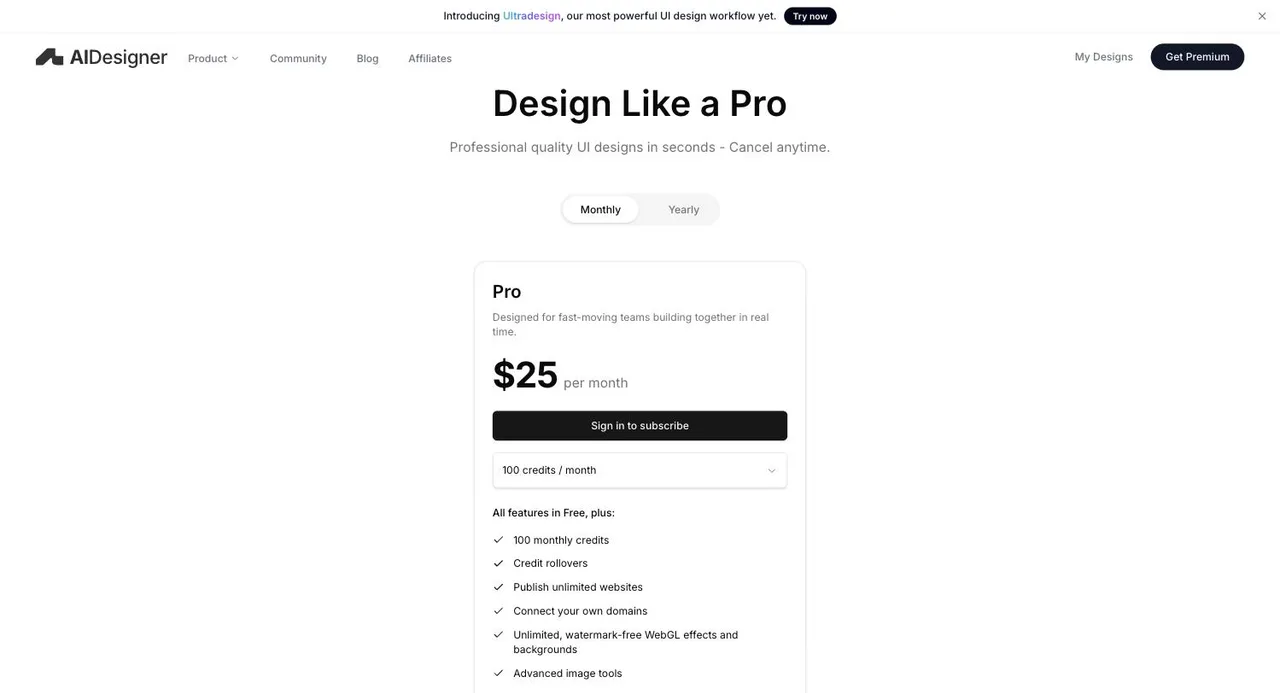
$25/month
100 credits a month at the default tier
On the monthly toggle, with a dropdown that starts at 100 credits a month and scales upward. Credit rollovers, unlimited published websites, custom domains, WebGL effects, advanced image tools.
Captured from aidesigner.ai/pricing on 21 September 2026, on the monthly toggle; a yearly toggle exists and was not priced out here. Pro is a single tier with a credit selector — the default is 100 credits a month at $25, and larger allowances cost more. AIDesigner does not publish a credits-per-screen conversion, so no screen count is claimed for it. The free tier is referenced but its limits are not stated on the pricing page. Check the live page before quoting any of this.
| For mobile app screens | floow.design | AIDesigner |
|---|---|---|
| What it designs | iOS and Android app screens only | UI, brand and visual assets, with website publishing |
| Free tier | A one-time 150-credit trial — three screens — then a paid plan | Yes — limits not published on the pricing page |
| Entry paid plan | Free for three screens, then $9.99 for roughly 40 a month | $25/month for 100 credits at the default tier |
| Publishing and hosting | Not offered — floow designs, it does not host | Unlimited websites on your own domains |
| Visual effects | Image generation, no WebGL | Unlimited watermark-free WebGL effects and backgrounds |
| Code export | Flutter, React Native, SwiftUI and Jetpack Compose | Not published on the pricing page |
| Mobile platform detail | Safe areas, Dynamic Island, notch insets and platform navigation applied per screen | Mobile is one target among many |
| Credit rollover | No — monthly allowance | Yes |
The feature list tells you who it is for
AIDesigner's Pro plan lists, in order: 100 monthly credits, credit rollovers, publish unlimited websites, connect your own domains, unlimited watermark-free WebGL effects and backgrounds, advanced image tools. Three of those six are about getting a website live and making it look striking.
That is not a criticism — it is a coherent product, and the WebGL work in particular is something no tool on this site competes with. But it does mean the centre of gravity is web and brand, not app screens. The site's own description is 'AI Designer for UI, Brands & Visual Assets'.
floow.design has no publishing, no domains and no WebGL. It draws mobile screens and hands them to a mobile team as Figma or as Flutter, React Native, SwiftUI or Jetpack Compose components. Different jobs.
On the credits, and what they buy
AIDesigner's default Pro allowance is 100 credits a month at $25, with a dropdown that scales it upward. It does not publish what a credit buys, so there is no honest way to convert that into a screen count, and this page does not try.
What can be said is the shape of the comparison at a similar price. floow.design charges 50 credits per generated screen, so Starter's 8,000 credits at $17.49 is roughly 160 screens and Pro's 40,000 at $49.99 is roughly 800. If AIDesigner's 100 credits map anywhere near one-to-one with generations, the volume gap at the entry tier is large.
Credit rollovers are a real advantage on their side, though. floow's allowance resets monthly and unused credits are gone.
When floow.design wins
When the output is an app rather than a site. There is no overlap on publishing and hosting, so this is the whole question.
When you need native code. Flutter, SwiftUI and Jetpack Compose are not on AIDesigner's published list.
When you are generating at volume, because the entry-tier allowances are not close.
When the screens need to move — floow animates and exports video.
What AIDesigner is plainly better at
Shipping a website. Unlimited published sites on your own domain, included in a $25 plan, is a complete path from prompt to live page. floow.design does not do any part of that.
Visuals. Unlimited watermark-free WebGL effects and backgrounds is a capability nothing here matches, and for landing pages and brand work it is the reason to choose them.
Breadth in one subscription — UI, brand assets and advanced image tools together.
And the free tier plus credit rollovers, both friendlier to occasional use than floow.design's monthly reset and one-time trial.
Frequently asked questions
How much does AIDesigner cost?
Pro is $25 a month on the monthly toggle, with a credit selector that starts at 100 credits a month and scales upward for more. A yearly toggle is also offered. A free tier exists but its limits are not stated on the pricing page. Captured from aidesigner.ai/pricing on 21 September 2026.
Is AIDesigner good for mobile app design?
It generates UI, but its paid features centre on publishing websites, connecting domains and WebGL backgrounds, and it describes itself as an AI designer for UI, brands and visual assets. floow.design draws mobile app screens only, applies iOS and Android conventions by default, and exports native mobile code.
Can AIDesigner export mobile code?
Its pricing page does not list code export among Pro's features, so we have not claimed it either way here — check with them directly. floow.design exports Flutter, React Native, SwiftUI and Jetpack Compose components.
AIDesigner or floow.design?
AIDesigner if you want a website live on your own domain with striking visuals, and brand assets in the same subscription. floow.design if you are designing app screens for iOS and Android and want them handed off as Figma or native mobile code.
Does floow.design have a free plan?
The Free plan grants 150 credits once per account and never renews them: exactly three generated screens, and one project to keep them in. After that, screen generation needs a paid plan starting at $9.99 a month. Separately, the thirty utility tools (app icon sizes, safe-area simulator, contrast checker and the rest) are free, unlimited and need no sign-up.
Prices and screenshots verified on 2026-09-21 from aidesigner.ai. We do not control that site — check it before relying on any figure here.

Your product already exists. Describe it.
One sentence in, a full set of iOS, Android or web screens out. Export to Figma, React, Flutter or React Native, or publish your web pages to your own domain.