
floow.design vs Sleek for mobile app screens
This is the closest comparison on the site. Sleek and floow.design are both AI tools that design mobile app screens from a description, both meter work in credits, and both export to Figma and code. The differences are volume per pound, what the code export targets, and how much of the surrounding workflow each one carries.

The short answer
These two are genuinely alike, right down to the way in: both hand a new account one-time trial credits rather than a renewing free tier, so you can judge either before paying. If you are already paying and generating screens continuously, floow.design is substantially cheaper per screen at every tier, and it exports to four native mobile frameworks where Sleek exports HTML and React with Tailwind. Sleek is the better fit if your hand-off is to a web stack or a coding agent building in React; floow.design if the hand-off is to Flutter, SwiftUI, Jetpack Compose or React Native.
Where floow.design is stronger
- Materially more screens per pound. Starter is $17.49 for roughly 160 screens against Sleek's $39 list for about 100; Pro is $49.99 for roughly 800 against $69 for about 650.
- Code export targets four native mobile frameworks — Flutter, React Native, SwiftUI and Jetpack Compose — where Sleek exports HTML and React with Tailwind.
- Motion: screens can be animated and exported as video, which Sleek does not offer.
- Thirty free design tools with no sign-up wall, against Sleek's free tier which still asks you to make an account.
- An MCP server with fourteen tools, so an editor-side agent can create projects, plan flows and write screens onto a canvas you are watching.
What Sleek does better
- The free tier also carries a standing project and limited code and Figma exports, not just the trial credits.
- Native editable Figma layers on export, not a flattened import.
- Export to AI builders and shareable preview links on Starter, which is a genuinely useful hand-off for vibe-coding workflows.
- REST API and an agent skill on Pro and Team, pitched directly at Claude Code, Cursor and Codex.
- An App Store Screenshots product alongside the design tool.
- Clear, published credit arithmetic — roughly 30 credits per generated screen, 5–30 to edit one — so you can model your own usage before paying.
Sleek pricing
Free
$0
A handful, from one-time trial credits
No credit card. One-time trial AI credits, 1 project, limited code and Figma exports.
Starter
$39/month
Roughly 100 screens
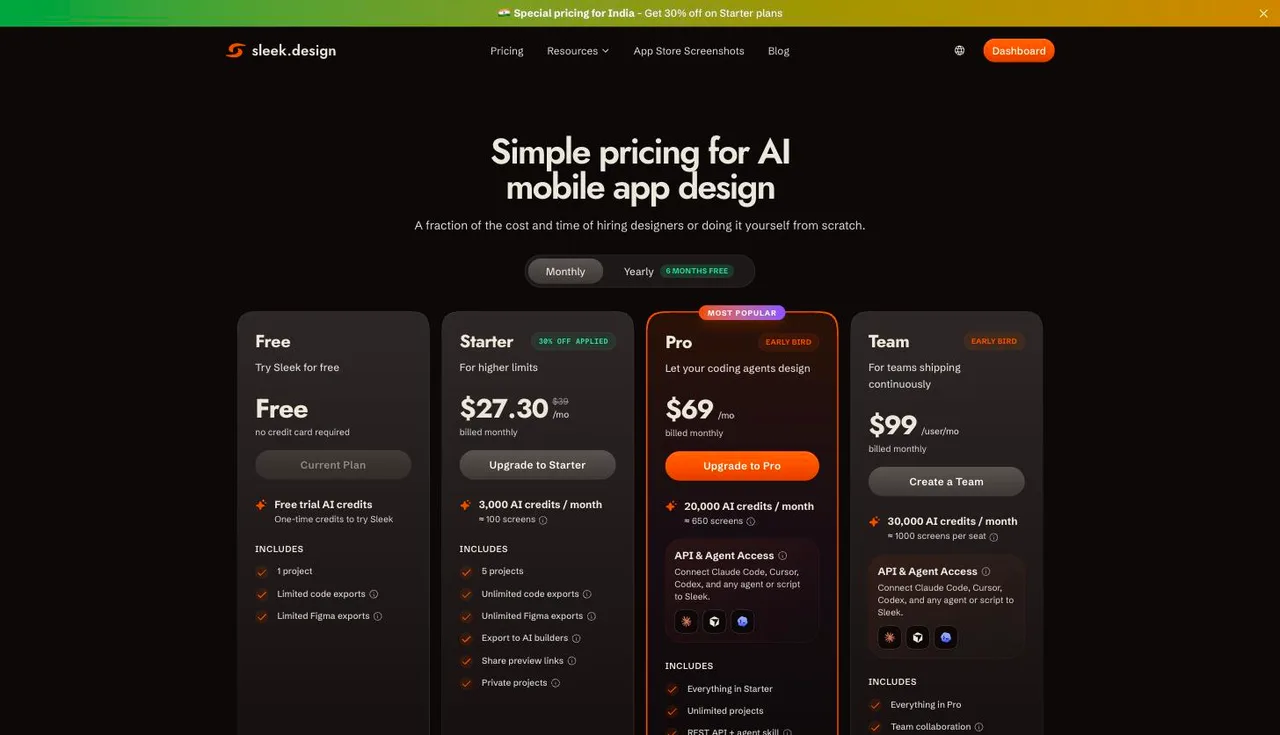
Listed at $27.30 during an India-only 30% promotion. 3,000 AI credits a month, 5 projects.
Pro
$69/month
Roughly 650 screens
20,000 AI credits a month, unlimited projects, REST API and agent skill.
Team
$99/user/month
Roughly 1,000 screens per seat
30,000 AI credits per seat a month, plus team collaboration.
Captured from sleek.design/pricing on 21 September 2026, on the monthly toggle. The Starter price displayed to us was $27.30 because a banner offered 'Special pricing for India — Get 30% off on Starter plans'; the struck-through list price is $39, and that is the figure used in the table above so the comparison holds outside India. Sleek's yearly toggle advertises six months free. Screen counts are Sleek's own estimates shown next to each credit allowance. Check the live page before quoting any of this.
| For mobile app screens | floow.design | Sleek |
|---|---|---|
| What it designs | Mobile app screens | Mobile app screens |
| Free tier | Yes — a one-time 150-credit trial, three screens, no card | Yes — one-time trial credits, 1 project, no card |
| Entry paid plan | $17.49/month for roughly 160 screens | $39/month for roughly 100 screens |
| High-volume plan | $49.99/month for roughly 800 screens | $69/month for roughly 650 screens |
| Code export | Flutter, React Native, SwiftUI and Jetpack Compose | HTML and React with Tailwind CSS |
| Figma export | Figma export | Native editable Figma layers |
| Agent access | MCP server and REST API, on Pro ($49.99) and Team | REST API and agent skill, on Pro and above |
| Animation | Screens animate and export as video | Not offered |
The credit arithmetic, side by side
Both products meter in credits, which makes this unusually comparable. Sleek publishes its conversion: roughly 30 credits to generate a screen, 5 to 30 to edit one. So 3,000 credits on Starter is about 100 screens, 20,000 on Pro about 650, and 30,000 on Team about 1,000 per seat — Sleek's own figures, printed next to each plan.
floow.design costs 50 credits to design a screen. Starter's 8,000 credits a month is roughly 160 screens at $17.49; Pro's 40,000 is roughly 800 at $49.99. Against Sleek's $39 for 100 and $69 for 650, floow is cheaper per screen at both tiers — meaningfully so at entry level, more modestly at volume.
One caveat worth stating plainly: the Starter price we saw on Sleek's site was $27.30, not $39, because a banner was running a 30% discount for India. The table above uses the $39 list price so the comparison is not distorted by where this page happened to be written. If you are in India, Sleek's entry tier may well be cheaper than it looks here.
Two tools running the same loop
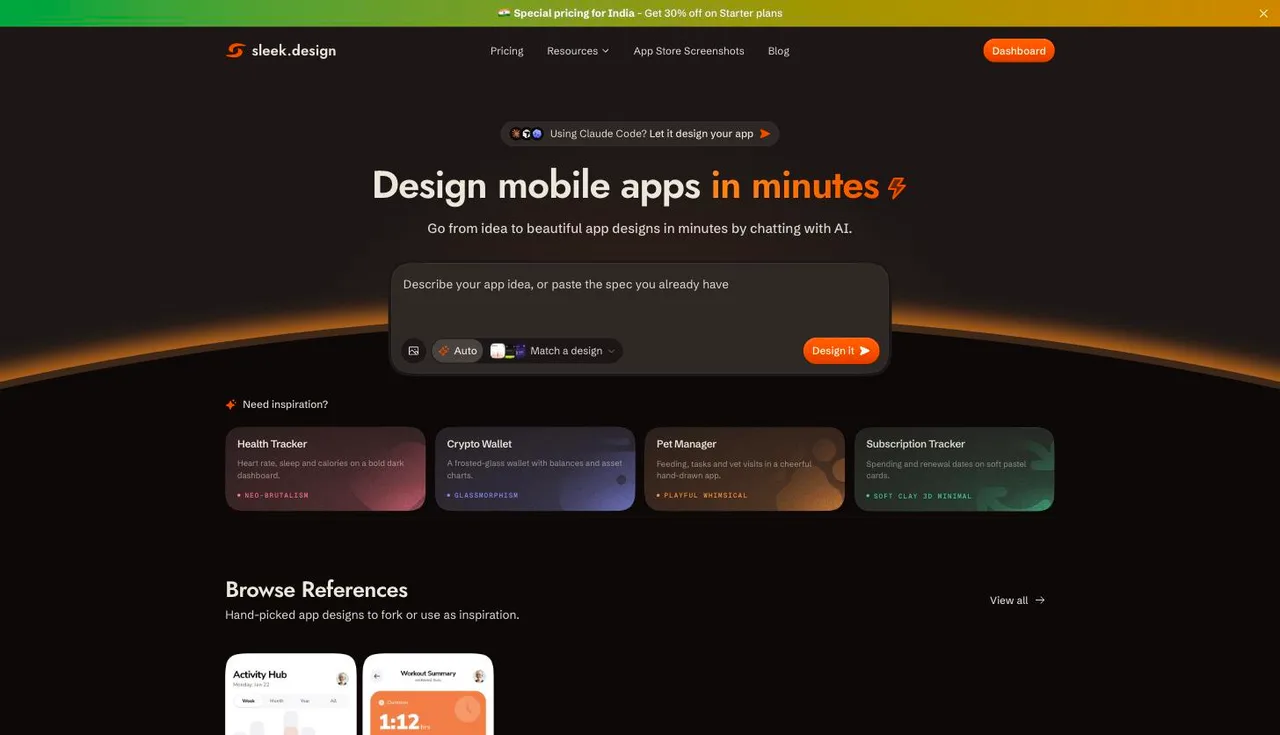
There is no point pretending this is a comparison between different categories. Sleek's homepage is a prompt box reading 'Describe your app idea, or paste the spec you already have', with inspiration cards for a health tracker, a crypto wallet, a pet manager and a subscription tracker. That is the same loop floow.design runs, aimed at the same person.
Both have also arrived at agent access as a differentiator, and both gate it the same way. Sleek's banner pitches Claude Code directly and ships a REST API plus an agent skill on Pro and above; floow.design publishes an MCP server with fourteen tools on Pro and Team. The difference is the price of that tier — $49.99 against $69 — and the volume behind it.
Where they genuinely diverge is the hand-off. Sleek exports HTML and React with Tailwind — a web stack, which suits a team whose 'app' is a React Native or web-view build, and which drops neatly into a coding agent. floow.design exports Flutter, React Native, SwiftUI and Jetpack Compose. If your app is native, that difference is the whole decision.
When floow.design wins
When you are generating continuously. The per-screen gap compounds: at Pro, roughly 800 screens for $49.99 against roughly 650 for $69 changes what you are willing to throw away and redraw.
When the target is native. Flutter, SwiftUI and Jetpack Compose are not on Sleek's export list, and for a native team that is not a detail.
When the screens need to move. floow.design animates screens and exports video; Sleek does not offer this.
When you want agent access. Both put it on their upper tier, so compare those directly: floow Pro is $49.99 for roughly 800 screens against Sleek Pro at $69 for roughly 650.
What Sleek is plainly better at
A more complete free tier. Both hand out one-time trial credits, but Sleek's also includes a project and limited code and Figma exports.
Figma fidelity. Sleek advertises native editable Figma layers, which is a cleaner hand-off than an import a designer then has to unpick.
Adjacent work. An App Store Screenshots product sits alongside the design tool, and preview links plus 'export to AI builders' make the vibe-coding path smoother than ours.
Transparency about credits. Publishing the credits-per-screen conversion next to the price is a good practice and it made this comparison possible.
Frequently asked questions
How much does Sleek cost?
On the monthly toggle: Starter is $39 a month for 3,000 AI credits (about 100 screens), Pro is $69 for 20,000 credits (about 650 screens), and Team is $99 per user for 30,000 credits per seat (about 1,000 screens). A free tier gives one-time trial credits and one project. Captured from sleek.design/pricing on 21 September 2026 — note an India-only 30% discount was showing Starter at $27.30.
Is Sleek free?
There is a free tier. It needs no credit card and gives one-time trial AI credits, one project, and limited code and Figma exports. It is a trial rather than a plan you can live on. floow.design works the same way: 150 credits once, three screens, then a paid plan.
Sleek or floow.design — which is cheaper?
floow.design, at every paid tier, on list prices. Starter is $17.49 for roughly 160 screens against Sleek's $39 for about 100; Pro is $49.99 for roughly 800 against $69 for about 650. Both let you try before paying — Sleek with one-time trial credits, floow.design with a one-time 150-credit grant.
What is the difference between Sleek and floow.design?
They run the same loop — describe an app, get mobile screens, refine by chat. The substantive differences are code export (Sleek: HTML and React with Tailwind; floow: Flutter, React Native, SwiftUI, Jetpack Compose), animation (floow animates screens and exports video, Sleek does not), price per screen (floow is cheaper at every tier) and the free tier (Sleek has one, floow does not).
Does floow.design have a free plan?
The Free plan grants 150 credits once per account and never renews them: exactly three generated screens, and one project to keep them in. After that, screen generation needs a paid plan starting at $9.99 a month. Separately, the thirty utility tools (app icon sizes, safe-area simulator, contrast checker and the rest) are free, unlimited and need no sign-up.
Prices and screenshots verified on 2026-09-21 from sleek.design. We do not control that site — check it before relying on any figure here.

Your product already exists. Describe it.
One sentence in, a full set of iOS, Android or web screens out. Export to Figma, React, Flutter or React Native, or publish your web pages to your own domain.