
floow.design vs Figma Make for mobile app screens
Figma Make turns a prompt into a working, editable prototype inside Figma. floow.design draws iOS and Android app screens and nothing else. This page compares the two on mobile output alone, with prices read off Figma's live pricing page.
The short answer
Figma Make is the stronger product in almost every dimension except one: it is not aimed at mobile in particular. It sits inside the design tool your team probably already uses, it produces working prototypes with real code behind them, and its free Starter tier lets you try the thing properly. floow.design is narrower on purpose — every screen is an app screen, iOS and Android conventions are applied rather than requested, and the exports are mobile frameworks. Choose Figma Make if your work spans web and product surfaces and you are already in Figma. Choose floow.design if the output is always an app.
Where floow.design is stronger
- Mobile only. Safe areas, the Dynamic Island, notch insets and platform navigation are applied per screen because there is no other target to hedge against.
- Credits buy screens, not a whole AI suite. Figma's AI credits are pooled across Make, Motion, Sites, Buzz and every other AI feature, so a month of heavy Make use competes with everything else.
- Exports to four mobile frameworks — Flutter, React Native, SwiftUI and Jetpack Compose — rather than web code.
- A lower entry price: three screens free, then $9.99 a month against $16 for a Figma Professional full seat on the annual toggle, or $20 billed monthly.
- Thirty free design tools with no sign-up wall at all.
What Figma Make does better
- A genuinely free Starter tier: 150 AI credits a day, up to 500 a month, with no card.
- It lives inside Figma. Design systems, shared libraries, components, comments, multiplayer editing and dev handoff are all already there and already where your team works.
- Make produces a working prototype with real code behind it, not a static screen — including backend support via Supabase, and a stated direction of building locally against your own codebase.
- Advanced Dev Mode inspection and an MCP server are included from the Professional plan, so agent access is not a floow-only advantage.
- One subscription also covers Figma Motion, Figma Sites and Figma Buzz, which are separate products elsewhere.
- An enormous community, template ecosystem and hiring pool. Nothing on this page competes with that.
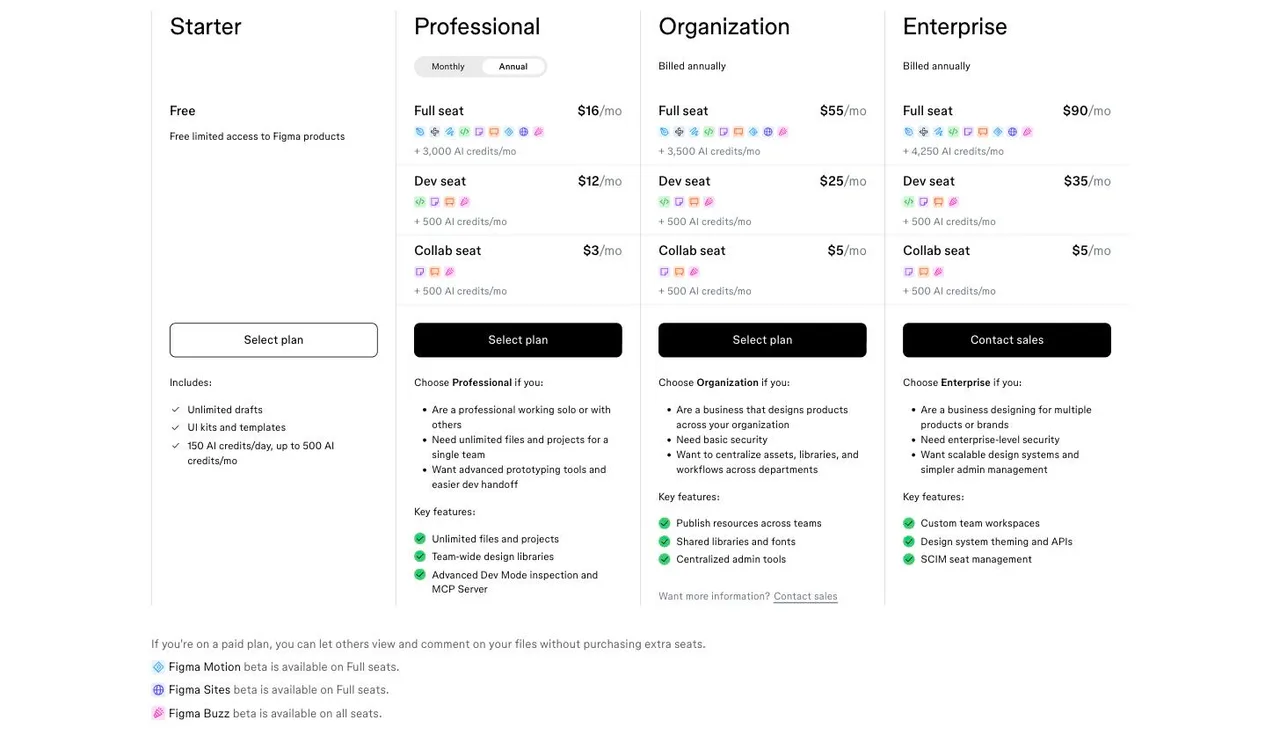
Figma Make pricing
Starter
$0
Metered in AI credits, not screens
Free limited access to Figma products. 150 AI credits a day, up to 500 a month.
Professional (full seat)
$16/month
Metered in AI credits, not screens
On the annual toggle; $20 billed monthly. Adds 3,000 AI credits a month. Includes Dev Mode inspection and an MCP server.
Organization (full seat)
$55/month
Metered in AI credits, not screens
Billed annually only. Adds 3,500 AI credits a month.
Enterprise (full seat)
$90/month
Metered in AI credits, not screens
Billed annually only. Adds 4,250 AI credits a month.
Read off figma.com/pricing on 21 September 2026. Prices above are the annual toggle; the monthly rate for a Professional full seat is $20. Figma also sells cheaper Dev seats ($12 annual / $15 monthly) and Collab seats ($3 annual / $5 monthly), both carrying 500 AI credits a month. Figma does not publish a credits-per-screen figure, so no screen count is claimed here — the two products meter different things, and converting between them would be a guess. Check the live page before quoting any of this.
| For mobile app screens | floow.design | Figma Make |
|---|---|---|
| What it designs | iOS and Android app screens only | Anything — web, product, marketing surfaces and app screens, as working prototypes |
| Free tier | A one-time 150-credit trial — three screens — then a paid plan | Starter is free: 150 AI credits a day, up to 500 a month |
| Entry paid plan | Free for three screens, then $9.99/month | $16/month annual, $20 monthly, per full seat |
| What credits buy | Screen generation and image generation only | A pool shared across Make, Motion, Sites, Buzz and every AI feature |
| Mobile platform detail | Safe areas, Dynamic Island, notch insets and platform navigation applied per screen | Mobile is one target among many; conventions are requested, not assumed |
| Output | Screens, exported as Figma, Flutter, React Native, SwiftUI or Jetpack Compose | A working, editable prototype with code behind it |
| Agent access | MCP server over Streamable HTTP, fourteen tools | MCP server included from Professional |
| Ecosystem | A small template set and a single-purpose canvas | Design systems, shared libraries, multiplayer editing, a vast community |
How Figma Make is actually priced
There is no Figma Make subscription. Make draws on the same AI credit pool as every other Figma AI feature, and that pool is attached to your seat. A free Starter seat carries 150 credits a day and up to 500 a month. A Professional full seat adds 3,000 a month, Organization 3,500 and Enterprise 4,250. Extra credits can be bought as an add-on.
Two things follow. First, the free tier is real — 500 credits a month costs nothing and needs no card, and that is more than enough to judge whether Make suits you. Second, those credits are shared. A heavy month in Make is a month you are not spending on Figma Motion, Sites or Buzz. If AI is central to how you work rather than occasional, the pooling is the thing to model, not the headline seat price.
floow.design meters differently: credits buy screen and image generation, and nothing else competes for them. Whether that is better depends entirely on whether you want the rest of the suite.
Make is aimed at product surfaces, not phones specifically
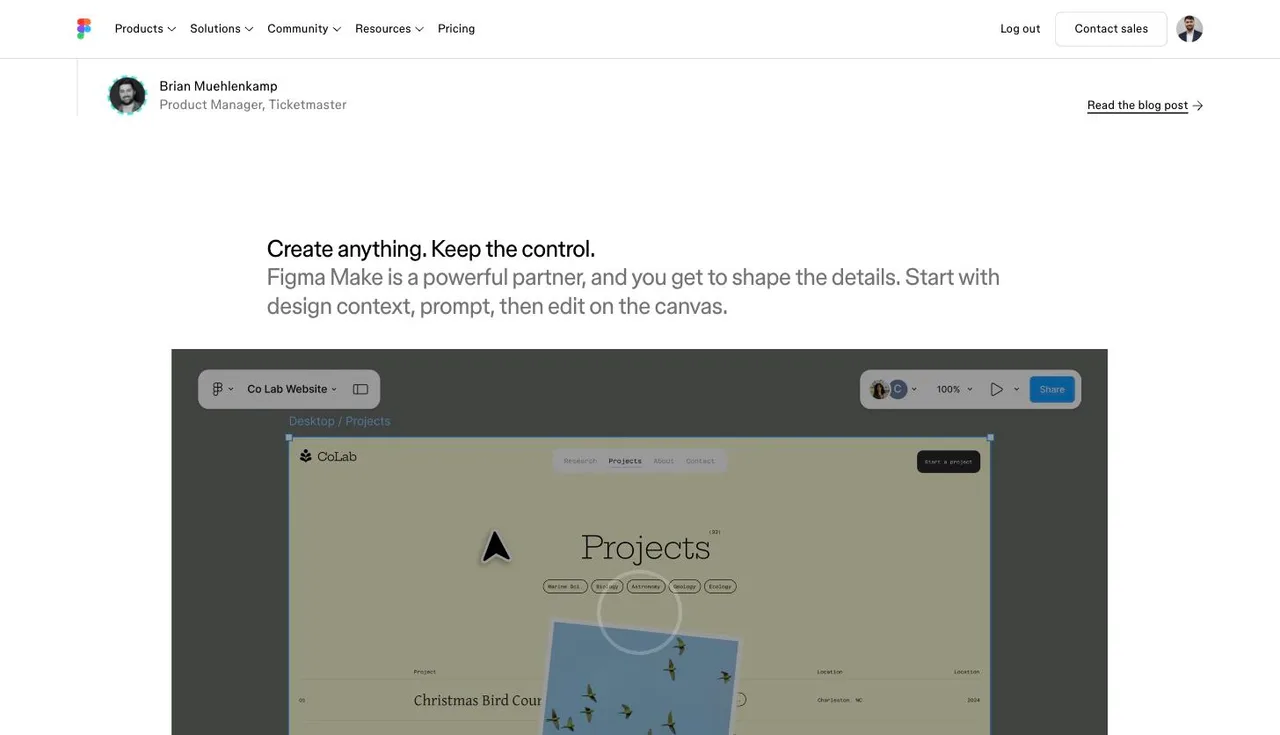
Figma's own worked example on the Make product page is a desktop website — the breadcrumb in their screenshot reads 'Desktop / Projects'. That is not a criticism; it is an accurate signal of where the product is pointed. Make will produce mobile layouts perfectly well when you ask for them.
The difference is what happens when you do not ask. In a tool whose canvas serves websites, dashboards, marketing pages and apps alike, mobile conventions are an instruction you have to remember to give. In floow.design there is no second target, so safe-area insets, the Dynamic Island cut-out, thumb-reachable placement and the divergence between iOS and Android navigation are applied by default.
If you design a landing page on Monday and an app screen on Tuesday, Make's breadth is worth far more than that specificity. If every screen you draw is an app screen, the specificity is the entire point.
When floow.design wins
When the output is always an app, and you want the platform rules applied rather than requested.
When the hand-off is mobile code. floow exports Flutter, React Native, SwiftUI and Jetpack Compose components. Make produces web code and a runnable prototype, which is a different destination.
When you want your AI spend to go to screens. $9.99 a month buys screen generation and nothing else; $16–20 a seat buys a share of an AI pool spread across an entire product suite.
What Figma Make is plainly better at
Nearly everything that is not mobile specificity. Make sits inside the tool your team already opens, next to the design system, the shared libraries and the comment threads. Nothing floow.design offers replaces that.
It produces something that runs. A Make output is a working prototype with real code behind it, with backend support via Supabase and a stated direction towards building locally in your own codebase. A floow screen is a screen.
And the free tier, which is the strongest argument on this page for them. 500 AI credits a month at no cost, inside a tool you already have, is a very low bar to clear before paying anyone.
Frequently asked questions
How much does Figma Make cost?
There is no separate Figma Make price. Make consumes AI credits attached to your Figma seat: free Starter seats get 150 a day and up to 500 a month, a Professional full seat adds 3,000 a month at $16 per month billed annually ($20 monthly), Organization 3,500 at $55, and Enterprise 4,250 at $90. Verified on figma.com/pricing on 21 September 2026.
Is Figma Make free?
There is a real free tier. A Starter seat costs nothing, needs no card, and carries 150 AI credits a day up to 500 a month, which Make draws from. Heavier use needs a paid seat or a credit add-on.
Is Figma Make good for mobile app design?
Yes, if you tell it what you want. Make handles mobile layouts well, but mobile is one target among many — Figma's own product page demonstrates Make on a desktop website. floow.design draws mobile screens only and applies iOS and Android conventions such as safe areas and the Dynamic Island by default rather than on request.
What is the best Figma Make alternative for mobile apps?
If you want breadth, an ecosystem and a free tier, stay in Figma. If every screen you draw is an app screen and you want Flutter, React Native, SwiftUI or Jetpack Compose out the other end, a mobile-only tool like floow.design is the closer fit. UX Pilot, Banani, Visily and Uizard are the other common alternatives, and all of them are broader than mobile.
Does floow.design have a free plan?
The Free plan grants 150 credits once per account and never renews them: exactly three generated screens, and one project to keep them in. After that, screen generation needs a paid plan starting at $9.99 a month. Separately, the thirty utility tools (app icon sizes, safe-area simulator, contrast checker and the rest) are free, unlimited and need no sign-up.
Prices and screenshots verified on 2026-09-21 from figma.com. We do not control that site — check it before relying on any figure here.

Your product already exists. Describe it.
One sentence in, a full set of iOS, Android or web screens out. Export to Figma, React, Flutter or React Native, or publish your web pages to your own domain.