
floow.design vs UX Pilot for mobile app screens
floow.design draws iOS and Android app screens and nothing else. UX Pilot covers web, mobile, diagrams and PRDs. This page compares the two on mobile output alone, with prices and screenshots taken from UX Pilot's live site.

The short answer
If every screen you draw is an app screen, floow.design is the closer fit: mobile is the only target, so iOS and Android conventions are applied rather than requested, volume is roughly 800 screens a month on Pro, and screens export as Flutter, React Native, SwiftUI or Jetpack Compose. UX Pilot is the better choice if you need breadth across web, diagrams and PRDs, or if you want a free tier you can live on — 13 screens a day at no cost is real, and floow.design answers that with a one-time 150-credit trial rather than a renewing allowance. Pick on whether your work is mobile-only.
Where floow.design is stronger
- Mobile only. Every screen is drawn against iOS and Android conventions — safe areas, the Dynamic Island, notch insets, platform navigation — rather than a web canvas resized to a phone.
- More screens per pound once you are paying: Starter is cheaper per screen than UX Pilot Pro, and Pro runs to roughly 800 screens a month.
- Code export to four mobile frameworks — Flutter, React Native, SwiftUI and Jetpack Compose — not just design handoff.
- Thirty free tools with no sign-up wall, from app icon sizes to safe-area simulators.
- An MCP server, so an editor-side agent can create projects and write screens onto a canvas you are watching.
What UX Pilot does better
- A genuinely usable free tier: 13 screens a day, no credit card, roughly 390 screens a month if you use it daily.
- Much broader scope — web design, wireframes, UX flows, swimlane and concept diagrams, PRDs and roadmaps sit in the same product.
- A Figma plugin and Figma Make support, so it fits an existing Figma-centred team without changing tools.
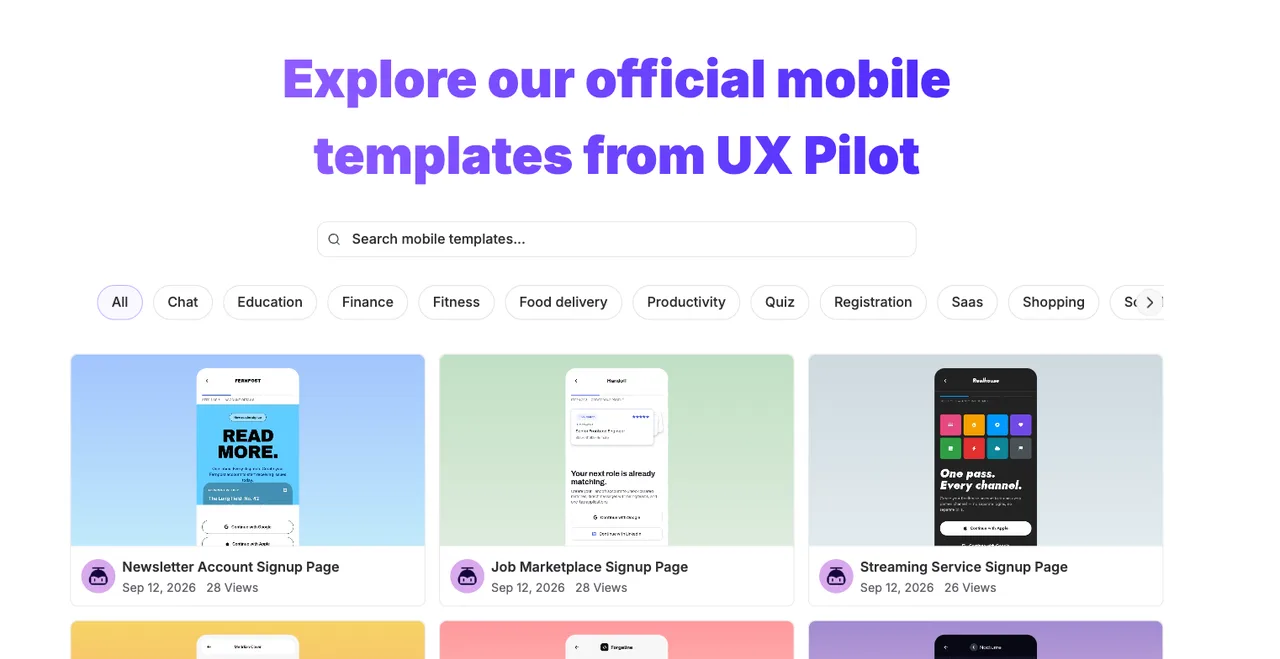
- A large, browsable mobile template library sorted by vertical: chat, finance, fitness, food delivery, SaaS, shopping and more.
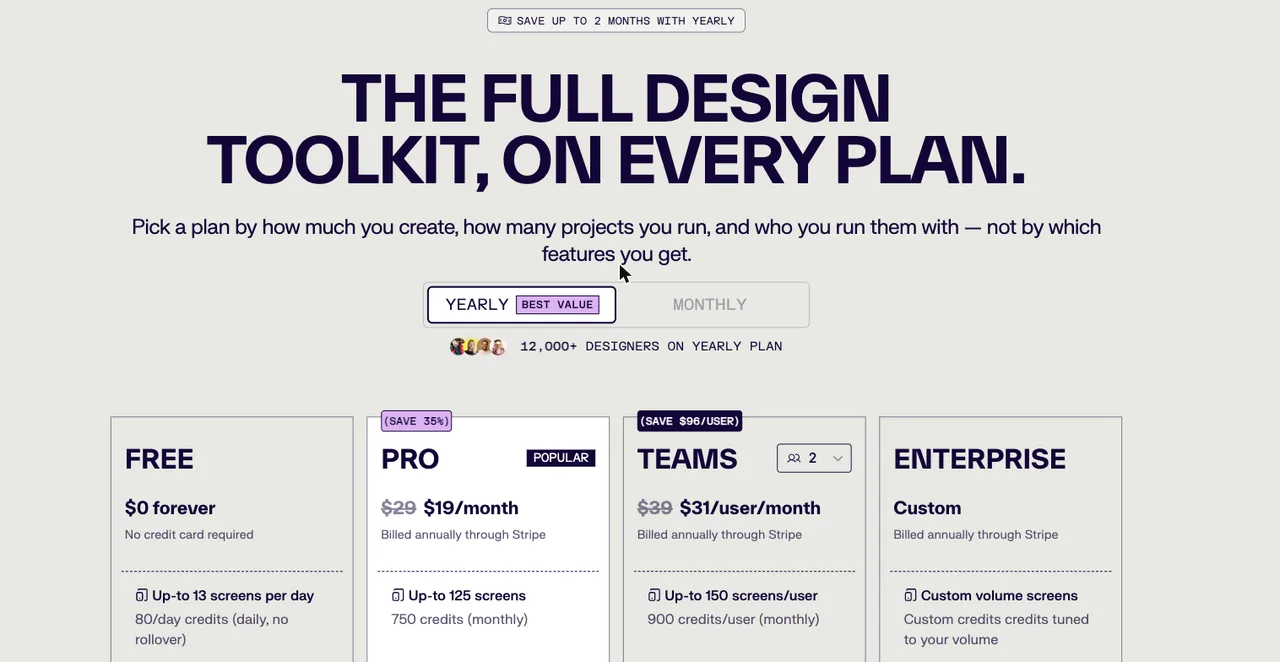
UX Pilot pricing
Free
$0
Up to 13 screens per day
No credit card. 80 credits a day, daily, no rollover.
Pro
$19/month
Up to 125 screens
Billed annually through Stripe. 750 credits a month.
Teams
$31/user/month
Up to 150 screens per user
Billed annually through Stripe. 900 credits per user a month.
Enterprise
Custom
Custom volume
Custom credit volume, billed through Stripe.
Taken from uxpilot.ai/plans on 21 September 2026, on the yearly toggle, which is the default and the cheaper of the two. Monthly list prices shown there are $29 for Pro and $39 per user for Teams. Check the live page before quoting these back to anyone — pricing moves.
| For mobile app screens | floow.design | UX Pilot |
|---|---|---|
| What it designs | iOS and Android app screens only | Web and mobile UI, plus wireframes, UX flows, diagrams, PRDs and roadmaps |
| Free tier | A one-time 150-credit trial — three screens — then a paid plan | 13 screens a day, forever, no card |
| Entry paid plan | $17.49/month for roughly 160 screens | $19/month for up to 125 screens |
| High-volume plan | $49.99/month for roughly 800 screens | $31/user/month for up to 150 screens per user |
| Mobile platform detail | Safe areas, Dynamic Island, notch insets and platform navigation applied per screen | Mobile screen mode and a mobile template library |
| Design handoff | Figma export plus Flutter, React Native, SwiftUI and Jetpack Compose | Figma plugin, Figma Make, design-to-code and HTML-to-design |
| Template library | A smaller mobile template set | Mobile, website and community templates, filterable by vertical |
| Agent access | MCP server over Streamable HTTP, fourteen tools | No published MCP server |
UX Pilot's pricing, as it actually reads
UX Pilot meters work in credits rather than seats alone. The free plan gives 80 credits a day, which it translates to about 13 screens, and those credits do not roll over — use them or lose them. Pro moves you to 750 credits a month and up to 125 screens, and Teams to 900 credits per user.
The headline number worth noticing is the free tier. Thirteen screens a day, used daily, is roughly 390 screens a month for nothing. For evaluating an AI design tool, or for a side project that produces a handful of screens a week, that is hard to argue with. floow.design grants 150 credits once, three screens, which is enough to see the output but is not a tier you can live on.
Where the maths turns is at volume. floow's Starter plan is $17.49 a month for roughly 160 screens against UX Pilot Pro's $19 for 125, and floow's Pro runs to roughly 800 screens a month. If you are producing screens continuously rather than occasionally, the per-screen cost separates quickly.
Mobile is the whole product here, and a mode in UX Pilot
UX Pilot's canvas has a screen-type selector with Mobile among the options, alongside wireframe and hi-fi modes. It is a capable mobile output, and the template library below is genuinely deep — signup screens for newsletters, job marketplaces and streaming apps, filtered by chat, education, finance, fitness, food delivery, productivity, quiz, registration, SaaS and shopping.
The difference is not quality, it is default. In a tool that also draws websites, dashboards and swimlane diagrams, mobile is one target among many. In floow.design there is no other target, so the things that only matter on a phone are applied without being asked for: safe-area insets, the Dynamic Island cut-out, thumb-reachable placement, platform-correct navigation patterns, and the gap between how iOS and Android expect the same screen to behave.
Whether that matters depends entirely on your work. If you design a marketing site on Monday and an app on Tuesday, the breadth is worth more than the specificity. If every screen you make is an app screen, the specificity is the product.
When floow.design wins
When the output is an app and nothing else. Mobile-only means the constraints are built in rather than remembered — and it means the export targets are mobile frameworks: Flutter, React Native, SwiftUI and Jetpack Compose, not just a Figma file or HTML.
When volume matters. Roughly 800 screens a month on Pro is a different kind of budget from 125, and it changes what you are willing to throw away and redraw.
When an agent needs to drive it. floow.design publishes an MCP server, so a coding agent in your editor can create a project, plan a flow, write screens onto a canvas you are watching, and read a screen back out as component code.
What UX Pilot is plainly better at
Breadth. AI app builder, web design generator, swimlane and concept diagram makers, PRD and roadmap generators, design-to-code and HTML-to-design all sit inside one subscription. If your job spans research artefacts and product documents as well as screens, that consolidation has real value.
Figma proximity. A Figma plugin and Figma Make support mean it slots into a team already living in Figma, rather than asking that team to move.
And the free tier, again, because it is the single strongest thing on this page for them. A tool you can use properly before paying is a tool more people will try.
Frequently asked questions
Is UX Pilot free?
Yes, and meaningfully so. The free plan costs nothing, needs no credit card, and allows up to 13 screens a day from 80 daily credits. The credits reset daily and do not roll over. Paid plans start at $19 a month billed annually.
How much does UX Pilot cost?
On the yearly toggle, which is the default: Pro is $19 a month and Teams $31 per user a month, both billed annually through Stripe. Monthly list prices are $29 and $39 per user. Enterprise is custom. Verified on uxpilot.ai/plans on 21 September 2026.
Is UX Pilot good for mobile app design?
Yes. It has a mobile screen mode and a large mobile template library sorted by vertical. The distinction is that mobile is one of several targets in UX Pilot, where floow.design draws mobile screens only and applies iOS and Android conventions — safe areas, the Dynamic Island, platform navigation — by default.
What is the best UX Pilot alternative for mobile apps?
It depends on what you need. If you want breadth and a free tier, stay with UX Pilot. If every screen you draw is an app screen and you want mobile framework code out the other end, a mobile-only tool like floow.design fits better. Banani, Visily and Uizard are the other common alternatives, and all three are broader than mobile.
Does floow.design have a free plan?
The Free plan grants 150 credits once per account and never renews them: exactly three generated screens, and one project to keep them in. After that, screen generation needs a paid plan starting at $9.99 a month. Separately, the thirty utility tools (app icon sizes, safe-area simulator, contrast checker and the rest) are free, unlimited and need no sign-up.
Prices and screenshots verified on 2026-09-21 from uxpilot.ai. We do not control that site — check it before relying on any figure here.

Your product already exists. Describe it.
One sentence in, a full set of iOS, Android or web screens out. Export to Figma, React, Flutter or React Native, or publish your web pages to your own domain.