
floow.design vs Banani for mobile app screens
Both turn a prompt into UI. Banani is a general AI design tool with an agent mode and an unlimited-credit tier; floow.design draws iOS and Android app screens only. This page compares them on mobile output.
The short answer
Banani's Pro plan is the strongest volume offer in this set — unlimited credits at $30 a month, where everyone else meters. If you generate constantly and do not need mobile-specific detail, that is hard to beat. floow.design is the closer fit when every screen is an app screen: platform conventions applied by default, and export to Flutter, React Native, SwiftUI and Jetpack Compose rather than a design file.
Where floow.design is stronger
- Mobile only. Safe areas, the Dynamic Island, notch insets and platform navigation are applied rather than requested.
- Code export aimed at four mobile frameworks — Flutter, React Native, SwiftUI and Jetpack Compose — not a generic code dump.
- Thirty free tools with no sign-up wall, from app icon sizes to a safe-area simulator.
- A live canvas: screens written over MCP or the API appear in an open editor tab within seconds.
- Motion — the same screens can be animated and exported as video, which none of these rivals do.
What Banani does better
- Unlimited credits on Pro at $30 a month — no metering, which no other tool compared here offers.
- A free tier that costs nothing: 12 monthly credits plus 3 daily, with private projects included.
- Agent mode on paid plans, for multi-step generation rather than one screen at a time.
- Unlimited Figma export on Plus, and MCP/code export.
- Roughly 40% off on yearly billing, making Plus $12 a month.
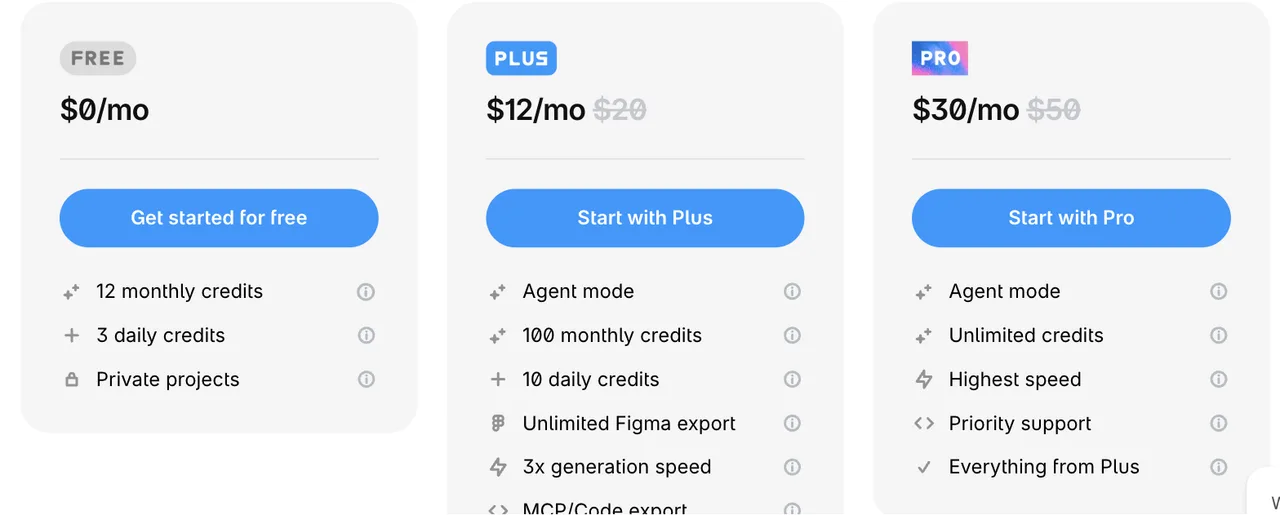
Banani pricing
Free
$0/month
12 monthly + 3 daily credits
12 monthly credits plus 3 daily credits. Private projects.
Plus
$12/month
100 monthly + 10 daily credits
Yearly billing, down from $20. Agent mode, unlimited Figma export, 3x generation speed, MCP/code export.
Pro
$30/month
Unlimited credits
Yearly billing, down from $50. Agent mode, highest speed, priority support, everything from Plus.
Read from banani.co/pricing on 21 September 2026 on the yearly toggle, which the site marks as roughly 40% off. Monthly list prices shown there are $20 for Plus and $50 for Pro.
| For mobile app screens | floow.design | Banani |
|---|---|---|
| What it designs | iOS and Android app screens only | General AI UI generation, web and mobile |
| Free tier | A one-time 150-credit trial — three screens — then a paid plan | 12 monthly plus 3 daily credits, private projects |
| Volume ceiling | Roughly 800 screens a month on Pro at $49.99 | Unlimited credits on Pro at $30/month |
| Mobile platform detail | Safe areas, Dynamic Island and platform navigation applied per screen | Mobile is one output among several |
| Code export | Flutter, React Native, SwiftUI and Jetpack Compose | MCP/code export |
| Animation | Motion — screens animate and export as video | Not offered |
Banani's pricing, as it actually reads
Banani meters credits with both a monthly and a daily allowance. Free gives 12 credits a month plus 3 a day. Plus is $12 a month on yearly billing with 100 monthly and 10 daily credits, agent mode, unlimited Figma export and MCP/code export. Pro is $30 a month with unlimited credits.
That Pro tier deserves attention. Unlimited generation at $30 a month is the most generous volume offer among the tools compared on this site — UX Pilot caps Pro at 125 screens, Visily at 3,000 credits, Uizard at 500 generations, and floow.design at roughly 800 screens. If raw throughput is what you are buying, Banani wins that row outright.
The daily cap on lower tiers is the thing to check. Three credits a day on Free is enough to evaluate, not enough to work, and 10 a day on Plus can bite on a heavy day even though the monthly figure looks comfortable.
Where the two tools actually diverge
Banani is a general UI generator with an agent that can take several steps on its own. floow.design is a mobile app design tool with a live canvas. The divergence is not quality of output, it is what the tool assumes you are making.
Because floow.design assumes a phone, it applies what only matters on a phone: safe-area insets, the Dynamic Island cut-out, thumb-reachable placement, and the gap between iOS and Android navigation. Because Banani assumes nothing in particular, those are decisions you carry.
The second divergence is what leaves the tool. Banani exports to Figma and to code. floow.design exports to Flutter, React Native, SwiftUI and Jetpack Compose specifically, and can animate the same screens and export video through Motion — which no tool on this comparison set offers.
When Banani wins
When you generate constantly and metering is the thing that frustrates you. Unlimited credits at $30 is a real answer to that, and this page is not going to argue with it.
When you want an agent to take several steps rather than prompting screen by screen.
When your output is not exclusively mobile — a general tool for general work is the right shape.
Frequently asked questions
Is Banani free?
Yes. The free plan gives 12 credits a month plus 3 daily credits and includes private projects. Paid plans start at $12 a month on yearly billing.
How much does Banani cost?
On yearly billing, Plus is $12 a month and Pro is $30 a month, marked down from $20 and $50 monthly. Pro includes unlimited credits, agent mode and priority support. Verified on banani.co/pricing on 21 September 2026.
Does Banani have unlimited generations?
Yes, on the Pro plan at $30 a month. That is the most generous volume tier among the AI design tools compared on this site — most, including floow.design, meter usage.
What is the best Banani alternative for mobile apps?
If unlimited volume is what you need, Banani is hard to replace. If every screen is an app screen and you want iOS and Android conventions applied by default plus mobile framework code, floow.design is the closer fit. UX Pilot, Visily and Uizard are the other common alternatives.
Prices and screenshots verified on 2026-09-21 from banani.co. We do not control that site — check it before relying on any figure here.

Your product already exists. Describe it.
One sentence in, a full set of iOS, Android or web screens out. Export to Figma, React, Flutter or React Native, or publish your web pages to your own domain.