
floow.design vs Flowstep for mobile app screens
Flowstep is a prompt-driven design tool with an unusually simple price list: free, or $15 a month. floow.design costs more and gives you far more volume. This page compares them on mobile output, with prices read off Flowstep's live pricing page.
The short answer
Flowstep is the cheapest credible way into this category — $15 a month with unlimited projects, unlimited exports and unlimited Copy to Figma, plus a free tier to try first. If your output is occasional, it is very hard to argue against. The catch is the meter: 80 messages a month, where one prompt is one message, and an iterative design session burns messages quickly. floow.design costs $17.49 at Starter for roughly 160 screens and $49.99 at Pro for roughly 800, and exports native mobile code. Flowstep for light or exploratory work; floow.design when you are producing screens continuously or handing off to a native codebase.
Where floow.design is stronger
- Volume. 80 messages a month is a tight budget for iterative work, where refining one screen can take several prompts. floow's Starter is roughly 160 screens and Pro roughly 800.
- Code export to four native mobile frameworks — Flutter, React Native, SwiftUI and Jetpack Compose. Flowstep's published hand-off is Copy to Figma.
- Mobile-only conventions applied per screen: safe areas, the Dynamic Island, notch insets and platform navigation.
- Motion — screens animate and export as video.
- An MCP server with fourteen tools, plus thirty free design tools that need no account.
What Flowstep does better
- A free tier with no card, so you can judge it before paying anything.
- $15 a month is the lowest paid entry point of any tool compared on this site.
- Unlimited projects, unlimited exports and unlimited Copy to Figma on the paid tier — none of those are metered.
- The message meter is easy to reason about: one prompt, one message. No credit arithmetic to do.
- Selectable Starter tiers by message volume, so the plan scales without jumping to an enterprise conversation.
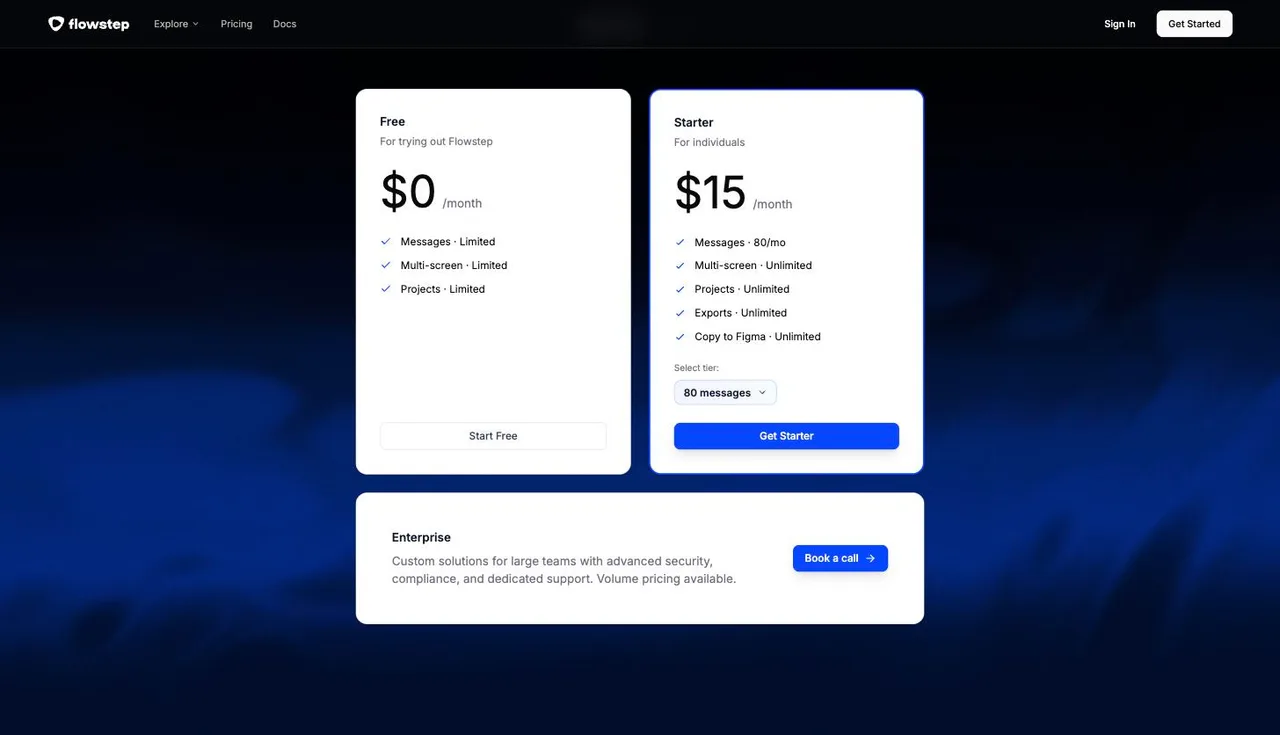
Flowstep pricing
Free
$0
Limited
For trying out Flowstep. Messages, multi-screen and projects all limited.
Starter
$15/month
80 prompts, not 80 screens
80 messages a month at the default tier, selectable upward. Unlimited multi-screen, projects, exports and Copy to Figma.
Enterprise
Custom
Custom volume
Advanced security, compliance and dedicated support. Volume pricing, booked through a call.
Captured from flowstep.ai/pricing on 21 September 2026. Flowstep meters in messages rather than screens — its own wording is 'Every time you prompt Flowstep, that's one message' — and quotas reset on the first of each month. The Starter card carries a tier selector that starts at 80 messages, so higher volumes are available at higher prices than the $15 headline. Because a message is a prompt and not a finished screen, no screen count is claimed for Flowstep here; converting between the two would be a guess. Check the live page before quoting any of this.
| For mobile app screens | floow.design | Flowstep |
|---|---|---|
| What it designs | iOS and Android app screens only | App and product UI from prompts, multi-screen flows |
| Free tier | A one-time 150-credit trial — three screens — then a paid plan | Yes — limited messages, multi-screen and projects |
| Entry paid plan | Free for three screens, then $9.99 for roughly 40 a month | $15/month for 80 messages |
| What the meter counts | Screens — 50 credits per generated screen | Messages — one prompt is one message, refinements included |
| High-volume path | $49.99/month for roughly 800 screens, self-serve | Higher message tiers, then a custom Enterprise call |
| Design hand-off | Figma export plus Flutter, React Native, SwiftUI and Jetpack Compose | Unlimited exports and unlimited Copy to Figma |
| Projects | Unlimited on every paid plan | Unlimited on Starter |
| Animation | Screens animate and export as video | Not offered |
Messages, not screens — and why that matters
Flowstep's meter is refreshingly simple: every prompt is one message, and Starter gives you 80 a month. There is no credit conversion to reason about, which is a genuine usability win over every credit-based tool on this site, floow.design included.
The trade-off shows up in iteration. Designing a screen is rarely one prompt. 'Make the chart purple', 'add a calendar view', 'make it more minimal' — that is three messages against one screen. A session that refines eight screens to a finish can consume a month's allowance, and the limit is on the conversation rather than the output.
floow.design charges 50 credits per generated screen, so Starter's 8,000 credits is roughly 160 screens at $17.49 and Pro's 40,000 roughly 800 at $49.99. Which model suits you depends on how much you argue with the tool. If you tend to accept the first output, Flowstep's $15 is excellent value. If you iterate hard, the message meter is the constraint to model.
Where the hand-off differs
Flowstep's published hand-off is Copy to Figma, unlimited on the paid tier, alongside unlimited exports. For a designer who lives in Figma and hands a file to engineers, that is a complete workflow and nothing here improves on it.
floow.design's hand-off goes further down the chain: Figma export, plus component code in Flutter, React Native, SwiftUI and Jetpack Compose, plus an MCP server so a coding agent can pull a screen into a repository directly. Whether that is worth the price difference depends entirely on whether anyone on your team wants code out of a design tool.
On the design itself, the difference is focus. Flowstep handles multi-screen product UI broadly; floow.design draws mobile only, so iOS and Android conventions — safe areas, the Dynamic Island cut-out, thumb reach, platform navigation — are applied rather than requested.
When floow.design wins
When you iterate. The message meter punishes refinement; a screen meter does not.
When you need native code. Flutter, SwiftUI and Jetpack Compose are not on Flowstep's list.
When volume grows. floow scales self-serve to roughly 800 screens a month at $49.99; Flowstep's path above its message tiers is a call with sales.
When the screens need to move, because Flowstep does not animate.
What Flowstep is plainly better at
Price, straightforwardly. $15 a month is the cheapest paid entry in this comparison set, and unlimited projects, exports and Copy to Figma at that price is a lot of tool for the money.
Clarity. One prompt, one message, quotas reset monthly. No credit maths, no per-feature conversion table, no wondering what an edit costs.
The free tier renews. Flowstep's limited messages come back every month; floow.design grants its 150 trial credits once and then asks for a card.
Frequently asked questions
How much does Flowstep cost?
There is a free tier with limited messages, multi-screen and projects. Starter is $15 a month and includes 80 messages, with unlimited multi-screen, projects, exports and Copy to Figma; a tier selector on the card allows higher message volumes. Enterprise is custom, arranged by a call. Captured from flowstep.ai/pricing on 21 September 2026.
What is a message in Flowstep?
Flowstep's own wording is 'Every time you prompt Flowstep, that's one message.' So a message is a prompt, not a finished screen — refinements to an existing screen consume the allowance too. Quotas reset on the first of each month.
Is Flowstep good for mobile app design?
It handles multi-screen product UI from prompts and exports to Figma without limits, so yes for many workflows. The distinction is that floow.design draws mobile only, applies iOS and Android conventions by default, and exports native mobile code rather than stopping at Figma.
Flowstep or floow.design — which should I pick?
Flowstep if your output is occasional, your budget is tight, and Figma is the end of the chain — $15 a month is hard to beat. floow.design if you iterate heavily, need more than a hundred or so screens a month, or want Flutter, React Native, SwiftUI or Jetpack Compose code out the other end.
Does floow.design have a free plan?
The Free plan grants 150 credits once per account and never renews them: exactly three generated screens, and one project to keep them in. After that, screen generation needs a paid plan starting at $9.99 a month. Separately, the thirty utility tools (app icon sizes, safe-area simulator, contrast checker and the rest) are free, unlimited and need no sign-up.
Prices and screenshots verified on 2026-09-21 from flowstep.ai. We do not control that site — check it before relying on any figure here.

Your product already exists. Describe it.
One sentence in, a full set of iOS, Android or web screens out. Export to Figma, React, Flutter or React Native, or publish your web pages to your own domain.