
floow.design vs Magic Patterns for mobile app screens
Magic Patterns is a prompt-to-UI tool aimed at product teams, with GitHub sync, SSO and team workspaces. floow.design draws iOS and Android app screens and nothing else. This page compares them on mobile output, with prices read off Magic Patterns' live pricing page.

The short answer
These aim at different buyers. Magic Patterns is built for a product team shipping web UI into an existing React codebase — GitHub sync, team workspaces from the entry tier, SSO and usage reporting on Business. floow.design is built for whoever is drawing app screens, and exports native mobile code. If your output lands in a web repo and several people need to work in it, Magic Patterns is the better shape. If your output is phone screens going to Flutter, SwiftUI or Jetpack Compose, floow.design is.
Where floow.design is stronger
- Mobile-only. Safe areas, the Dynamic Island, notch insets and platform navigation are applied per screen because there is no other target.
- Native mobile code export — Flutter, React Native, SwiftUI and Jetpack Compose — where Magic Patterns is React-shaped.
- More volume at the entry tier: $17.49 for roughly 160 screens against 1,000 credits at $17 a seat.
- Screens animate and export as video.
- Thirty free design tools with no sign-up wall at all.
What Magic Patterns does better
- A free tier with monthly credits, so you can try it before paying.
- GitHub sync from the Starter tier — generated UI goes into a real repository rather than a download.
- Team workspaces for 10 users included at $17 a seat, which is unusually generous at entry level.
- Credit rollovers, so an unused month is not simply lost.
- MCP included from Starter, not gated to a higher tier.
- A proper enterprise path: SSO, usage reporting, SCIM and access controls, custom credit pools and design-system import.
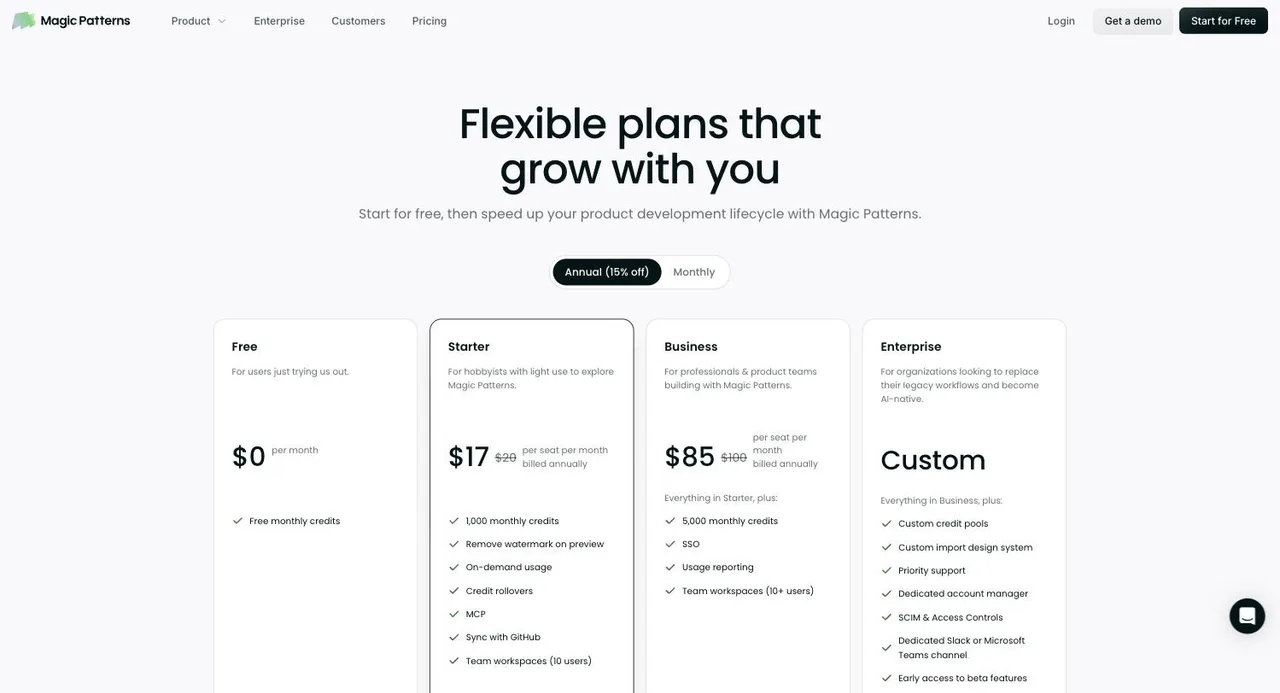
Magic Patterns pricing
Free
$0
Metered in credits
For users just trying it out. Free monthly credits.
Starter
$17/seat/month
Metered in credits
Billed annually; $20 monthly. 1,000 monthly credits, credit rollovers, MCP, GitHub sync, team workspaces for 10 users, watermark removed.
Business
$85/seat/month
Metered in credits
Billed annually; $100 monthly. 5,000 monthly credits, SSO, usage reporting, team workspaces for 10+ users.
Enterprise
Custom
Custom volume
Custom credit pools, design-system import, SCIM and access controls, dedicated account manager.
Captured from magicpatterns.com/pricing on 21 September 2026, on the annual toggle, which the page opens on and which it labels 15% off. Monthly list prices shown alongside are $20 for Starter and $100 for Business. Magic Patterns does not publish a credits-per-screen conversion, so no screen count is claimed for it here — converting between its credits and floow's would be a guess. Check the live page before quoting any of this.
| For mobile app screens | floow.design | Magic Patterns |
|---|---|---|
| What it designs | iOS and Android app screens only | Product and web UI from prompts, for teams |
| Free tier | A one-time 150-credit trial — three screens — then a paid plan | Yes — free monthly credits |
| Entry paid plan | Free for three screens, then $9.99 for roughly 40 a month | $17/seat/month annual ($20 monthly), 1,000 credits |
| Code hand-off | Flutter, React Native, SwiftUI and Jetpack Compose | React, with GitHub sync from Starter |
| Mobile platform detail | Safe areas, Dynamic Island, notch insets and platform navigation applied per screen | Mobile is one target among many |
| Team features | Team plan at $69.99/user | Workspaces for 10 users at Starter, SSO and SCIM above |
| Credit rollover | No — monthly allowance | Yes |
| Animation | Screens animate and export as video | Not offered |
Built for a team, priced for a team
The thing that stands out on Magic Patterns' price list is how much team capability sits at the bottom tier. $17 a seat billed annually gets 1,000 monthly credits, credit rollovers, MCP, GitHub sync and a team workspace for ten users. Most tools in this category reserve workspaces and SSO for a plan two steps up.
Business at $85 a seat adds 5,000 credits, SSO and usage reporting, and Enterprise brings custom credit pools, design-system import and SCIM. That is a coherent ladder for an organisation, and it is the clearest signal of who the product is for.
floow.design's ladder is shaped for an individual designer or a small team: $9.99 to $49.99 for one person, $69.99 a seat for Team. If procurement, SSO and seat management are part of your decision, Magic Patterns has thought about that harder.
GitHub sync versus native mobile code
Magic Patterns syncs generated UI with GitHub from the Starter tier. For a React team that is close to the ideal hand-off — the design does not stop at a file you then have to reimplement, it lands in the repository.
The constraint is what that code is. Magic Patterns is React-shaped, which suits web and React Native-adjacent work. floow.design exports Flutter, React Native, SwiftUI and Jetpack Compose components, which suits a native mobile team and does not suit a web team at all.
Both publish an MCP server, and both include it at entry level rather than gating it, so the agent story is broadly even. The difference is purely what comes out the other end.
When floow.design wins
When the app is native. SwiftUI and Jetpack Compose are not on Magic Patterns' list, and no amount of prompting produces them.
When the platform conventions matter. A tool that draws mobile only applies safe areas, the Dynamic Island cut-out and platform navigation by default; a general product-UI tool waits to be told.
When the screens need to move — floow animates and exports video, Magic Patterns does not.
What Magic Patterns is plainly better at
Working with other people. Ten-user workspaces at the entry tier, SSO and usage reporting on Business, SCIM and access controls on Enterprise. floow.design's team story is thinner.
Landing in a codebase. GitHub sync from Starter is a materially better hand-off than an export, if your repo is React.
Not wasting what you paid for. Credits roll over on Magic Patterns; floow's monthly allowance does not.
And the free tier renews. floow.design's 150 credits are granted once; Magic Patterns hands out free credits every month.
Frequently asked questions
How much does Magic Patterns cost?
On the annual toggle: Free at $0 with monthly credits, Starter at $17 per seat per month with 1,000 credits, Business at $85 per seat with 5,000 credits, and custom Enterprise pricing. Monthly list prices are $20 and $100. Captured from magicpatterns.com/pricing on 21 September 2026.
Is Magic Patterns free?
There is a free tier with free monthly credits, aimed at people trying the product. Preview output carries a watermark until you reach the Starter tier.
Is Magic Patterns good for mobile app design?
It generates product UI from prompts and will produce mobile layouts, but its hand-off is React and GitHub sync, which is web-shaped. floow.design draws mobile screens only, applies iOS and Android conventions by default, and exports Flutter, React Native, SwiftUI and Jetpack Compose.
Magic Patterns or floow.design?
Magic Patterns if you are a product team shipping web UI into a React repo and you need workspaces, SSO and GitHub sync. floow.design if you are drawing app screens and want native mobile code out the other end. The team features and the code target are the two things that should decide it.
Does floow.design have a free plan?
The Free plan grants 150 credits once per account and never renews them: exactly three generated screens, and one project to keep them in. After that, screen generation needs a paid plan starting at $9.99 a month. Separately, the thirty utility tools (app icon sizes, safe-area simulator, contrast checker and the rest) are free, unlimited and need no sign-up.
Prices and screenshots verified on 2026-09-21 from magicpatterns.com. We do not control that site — check it before relying on any figure here.

Your product already exists. Describe it.
One sentence in, a full set of iOS, Android or web screens out. Export to Figma, React, Flutter or React Native, or publish your web pages to your own domain.