
floow.design vs Visily for mobile app screens
floow.design draws iOS and Android app screens and nothing else. Visily is a whiteboard-shaped design tool that turns sketches, screenshots and prompts into editable UI for web and mobile. This page compares them on mobile output alone.
The short answer
Visily is the better fit if your work spans web and mobile and you want a board you can think on — sketch, screenshot-import, wireframe and hi-fi all live on one canvas, and Pro is $11 per editor. floow.design is narrower: mobile only, iOS and Android conventions applied by default, and roughly 800 screens a month on Pro against Visily's 3,000 credits. Choose on whether the board matters more than the platform detail.
Where floow.design is stronger
- Mobile only. Safe areas, the Dynamic Island, notch insets and platform navigation are applied per screen rather than being your job.
- Roughly 800 screens a month on Pro, against 3,000 credits on Visily Pro — credits and screens are not the same unit, so check both against your own volume.
- Code export targeting four mobile frameworks: Flutter, React Native, SwiftUI and Jetpack Compose.
- Thirty free tools with no sign-up wall — app icon sizes, safe-area simulator, contrast checker and the rest.
- A canvas an agent can drive over MCP, writing screens you watch appear.
What Visily does better
- A real free tier — 300 AI credits a month, no card, enough to judge the tool properly.
- Cheapest paid entry of the four rivals here at $11 per editor a month billed annually.
- A whiteboard model: sketches, screenshots and prompts all become editable UI on one infinite board, which suits early exploration.
- Figma export and import — import matters, and few tools in this set do it.
- Export to Code and a Visily MCP server on Pro and Business.
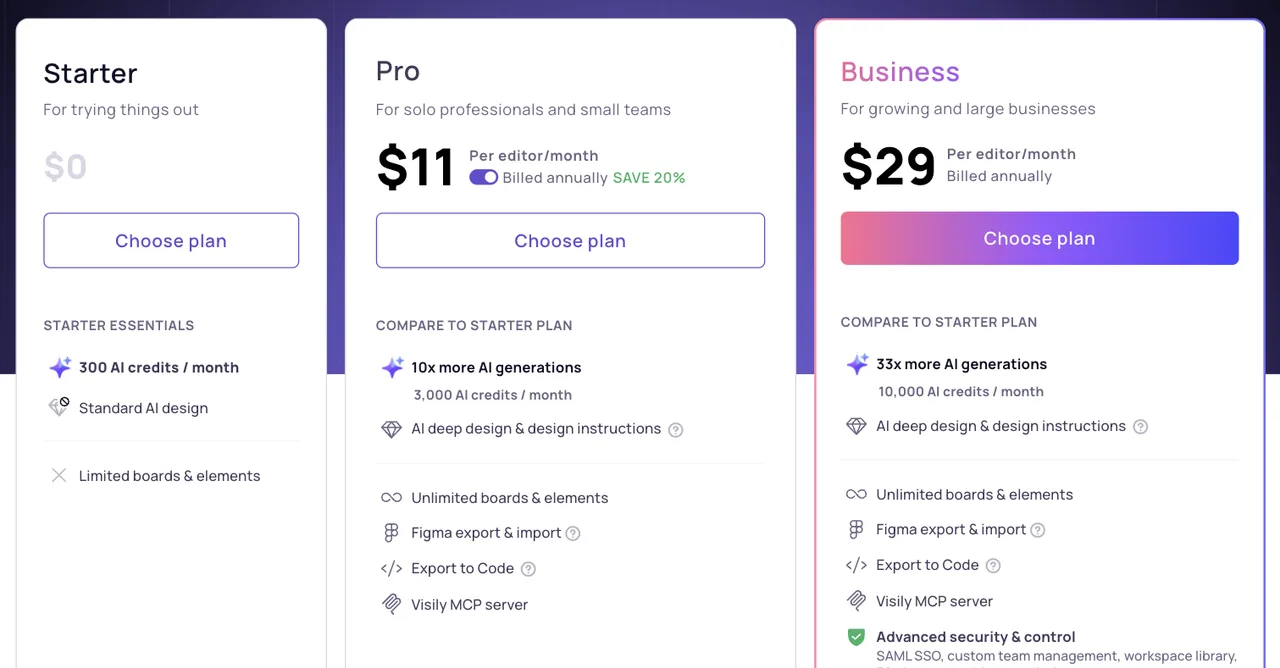
Visily pricing
Starter
$0
Limited boards & elements
300 AI credits a month, standard AI design.
Pro
$11/editor/month
Unlimited boards & elements
Billed annually, save 20%. 3,000 AI credits a month, Figma export and import, export to code, MCP server.
Business
$29/editor/month
Unlimited boards & elements
Billed annually. 10,000 AI credits a month, plus SAML SSO, custom team management and a workspace library.
Read from visily.ai/pricing on 21 September 2026 on the annual toggle. Visily meters AI credits rather than screens, so a credit is not a screen — compare against your own usage before switching.
| For mobile app screens | floow.design | Visily |
|---|---|---|
| What it designs | iOS and Android app screens only | Web and mobile UI on an infinite board, from sketches, screenshots or prompts |
| Free tier | A one-time 150-credit trial — three screens — then a paid plan | 300 AI credits a month, no card |
| Entry paid plan | $17.49 a month for roughly 160 screens | $11 per editor a month, 3,000 credits |
| Mobile platform detail | Safe areas, Dynamic Island and platform navigation applied per screen | Mobile is one of several targets on the board |
| Figma | Export only | Export and import |
| Code export | Flutter, React Native, SwiftUI and Jetpack Compose | Export to Code |
| Agent access | MCP server over Streamable HTTP, fourteen tools | Visily MCP server on Pro and Business |
Visily's pricing, as it actually reads
Visily meters AI credits, not screens. Starter is free with 300 credits a month. Pro is $11 per editor a month billed annually with 3,000 credits, unlimited boards, Figma export and import, export to code and an MCP server. Business is $29 per editor with 10,000 credits and the security controls larger teams ask for.
It is the cheapest paid entry point among the tools on this site, and the free tier is genuine rather than a trial. If cost is the deciding factor and your work is not exclusively mobile, that is a strong position and this page will not pretend otherwise.
The honest caveat runs both ways: a credit is not a screen. Deep design and design instructions consume more than a standard generation, so 3,000 credits does not translate cleanly into 3,000 screens. Measure against your own usage rather than either marketing page.
A board to think on, against a tool that only draws phones
Visily's shape is a whiteboard. You can drop a screenshot, scribble a sketch, or type a prompt, and it becomes editable UI on an infinite canvas alongside everything else. For the messy early part of a project — where the artefacts are half-formed and web and mobile sit side by side — that is genuinely useful, and it is not what floow.design does.
floow.design has no board. It has a canvas of app screens. The trade is deliberate: because mobile is the only target, the things that only matter on a phone are applied without being asked for — safe-area insets, the Dynamic Island cut-out, thumb reach, and the difference between how iOS and Android expect the same screen to behave.
If you are exploring, the board wins. If you are producing app screens in volume and handing them to mobile engineers, the narrower tool wins.
When floow.design wins
When the output is an app and nothing else, and when the export target is mobile framework code rather than a design file — Flutter, React Native, SwiftUI or Jetpack Compose.
When volume matters: roughly 800 screens a month on Pro changes what you are willing to throw away and redraw.
Both tools publish an MCP server, so on agent access they are level. That is worth saying plainly rather than claiming an edge that is not there.
Frequently asked questions
Is Visily free?
Yes. The Starter plan costs nothing and includes 300 AI credits a month with standard AI design, though boards and elements are limited. Paid plans start at $11 per editor a month billed annually.
How much does Visily cost?
On the annual toggle, Pro is $11 per editor a month and Business $29 per editor a month. Pro includes 3,000 AI credits monthly, Figma export and import, export to code and the Visily MCP server. Verified on visily.ai/pricing on 21 September 2026.
Is Visily good for mobile app design?
It handles mobile, but mobile is one target among several on a board that also covers web. floow.design draws only iOS and Android screens, so platform conventions are applied by default rather than left to you.
What is the best Visily alternative for mobile apps?
If you need the board and the low price, stay with Visily. If every screen is an app screen and you want mobile framework code out the other end, a mobile-only tool like floow.design fits better. UX Pilot, Banani and Uizard are the other common alternatives.
Prices and screenshots verified on 2026-09-21 from visily.ai. We do not control that site — check it before relying on any figure here.

Your product already exists. Describe it.
One sentence in, a full set of iOS, Android or web screens out. Export to Figma, React, Flutter or React Native, or publish your web pages to your own domain.