
floow.design vs Uizard for mobile app screens
Uizard is the most established tool in this set — now part of Miro — with a deep template library and Autodesigner 2.0. floow.design draws iOS and Android app screens only. This page compares them on mobile output.

The short answer
Uizard is the safer institutional choice: it is part of Miro, it has the deepest template library of any tool here, and Pro is $12 a month. Its limit is generation volume — 500 AI generations a month on Pro, 3 on Free. floow.design trades breadth for mobile specificity and volume: roughly 800 screens a month, platform conventions applied by default, and export to four mobile frameworks.
Where floow.design is stronger
- Mobile only. Safe areas, the Dynamic Island, notch insets and platform navigation applied per screen.
- Far more generation headroom: roughly 800 screens a month on Pro against Uizard's 500 AI generations.
- Code export to four mobile frameworks — Flutter, React Native, SwiftUI and Jetpack Compose — rather than React handoff.
- Thirty free tools with no sign-up wall.
- An MCP server and a live canvas an agent can write to while you watch.
What Uizard does better
- The deepest template library in this comparison set — mobile, web, web-app and component templates, filterable by vertical, and the single biggest source of their organic traffic.
- Backed by Miro, which matters if procurement or longevity is part of your decision.
- Pro at $12 a month billed annually, with developer handoff to React.
- Autodesigner 2.0 as a named, versioned engine rather than an unlabelled model.
- A free tier for students and hobbyists with 2 projects and 10 free templates.
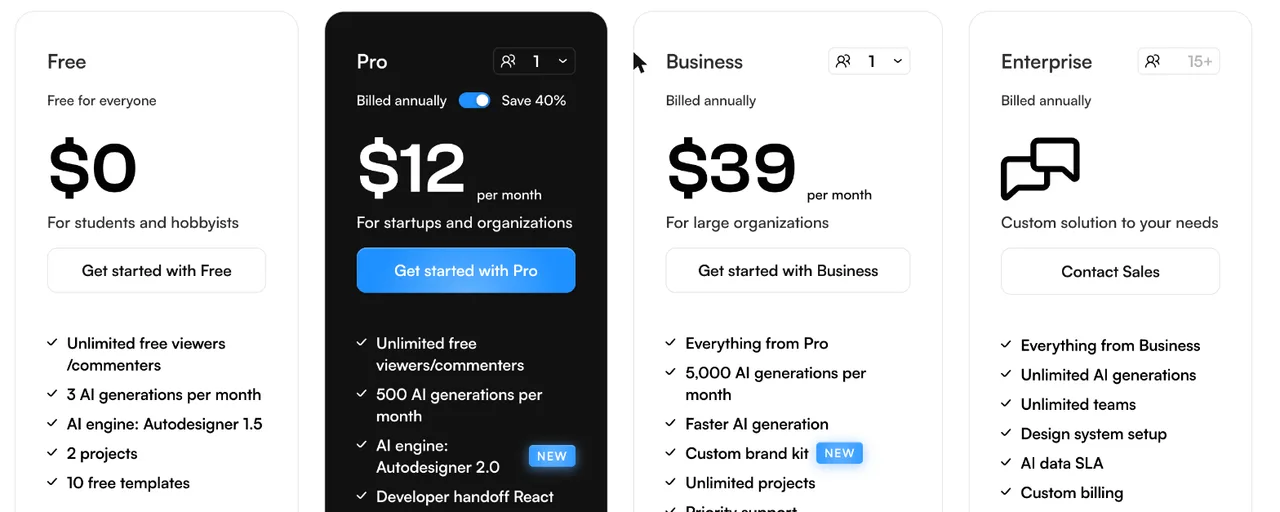
Uizard pricing
Free
$0
3 AI generations per month
For students and hobbyists. Autodesigner 1.5, 2 projects, 10 free templates.
Pro
$12/month
500 AI generations per month
Billed annually, save 40%. Autodesigner 2.0, developer handoff to React, unlimited free viewers.
Business
$39/month
5,000 AI generations per month
Billed annually. Faster AI generation, custom brand kit, unlimited projects, priority support.
Enterprise
Custom
Unlimited AI generations
Unlimited teams, design system setup, AI data SLA and custom billing.
Read from uizard.io/pricing on 21 September 2026 on the annual toggle. Uizard meters AI generations rather than screens; a generation may produce more than one screen, so compare against your own usage.
| For mobile app screens | floow.design | Uizard |
|---|---|---|
| What it designs | iOS and Android app screens only | Web, mobile and web-app UI from prompts, screenshots and sketches |
| Free tier | A one-time 150-credit trial — three screens — then a paid plan | 3 AI generations a month, 2 projects |
| Entry paid plan | $17.49/month for roughly 160 screens | $12/month for 500 AI generations |
| Volume ceiling | Roughly 800 screens a month on Pro at $49.99 | 5,000 generations a month on Business at $39 |
| Template library | A smaller mobile template set | Deep — mobile, website, web-app and component templates by vertical |
| Mobile platform detail | Safe areas, Dynamic Island and platform navigation applied per screen | Mobile is one target among several |
| Code export | Flutter, React Native, SwiftUI and Jetpack Compose | Developer handoff to React |
Uizard's pricing, as it actually reads
Uizard meters AI generations. Free gives 3 a month on Autodesigner 1.5 with 2 projects and 10 templates. Pro is $12 a month billed annually with 500 generations, Autodesigner 2.0 and developer handoff to React. Business is $39 with 5,000 generations, faster generation and a custom brand kit. Enterprise is custom with unlimited generations.
Pro at $12 is competitive, and Business at $39 for 5,000 generations is the highest metered ceiling in this set short of Banani's unlimited tier. The Free plan, at 3 generations a month, is a demo rather than a working allowance — that is the one number worth knowing before you start.
A generation is not necessarily one screen, which cuts in Uizard's favour when comparing against floow.design's screen counts. As with every tool here, measure against your own usage rather than either marketing page.
The template library is the real product
Uizard's organic footprint tells you what people actually use it for: its template pages carry hundreds of ranking keywords each, and a single mobile template page out-earns most of its blog. The library is filterable by vertical and covers mobile, website, web-app and component templates. If you want to start from something rather than from nothing, that is a genuine advantage and floow.design's template set is smaller.
floow.design starts from a prompt and a mobile canvas instead. Because mobile is the only target, the platform details are applied without being asked for — safe-area insets, the Dynamic Island, thumb reach, and the difference between iOS and Android navigation.
Uizard also carries something none of the others do: it is part of Miro. For teams where tool longevity and procurement matter, that is a real factor and worth naming.
When floow.design wins
When the output is an app and the handoff is mobile code — Flutter, React Native, SwiftUI or Jetpack Compose — rather than React.
When you produce screens continuously: roughly 800 a month on Pro against 500 generations, though the units differ and the comparison is not exact.
When you want an agent to drive the canvas over MCP, which Uizard does not publish.
Frequently asked questions
Is Uizard free?
There is a free plan, but it allows 3 AI generations a month with 2 projects and 10 templates — enough to try, not to work with. Paid plans start at $12 a month billed annually.
How much does Uizard cost?
On the annual toggle, Pro is $12 a month with 500 AI generations and Business $39 a month with 5,000. Enterprise is custom with unlimited generations. Verified on uizard.io/pricing on 21 September 2026.
Is Uizard good for mobile app design?
Yes, and its mobile template library is the deepest of any tool compared here. The difference is that mobile is one target among several in Uizard, where floow.design draws only iOS and Android screens and applies platform conventions by default.
What is the best Uizard alternative for mobile apps?
If templates and the Miro backing matter, stay with Uizard. If every screen is an app screen and you want mobile framework code out the other end, floow.design is the closer fit. UX Pilot, Visily and Banani are the other common alternatives.
Prices and screenshots verified on 2026-09-21 from uizard.io. We do not control that site — check it before relying on any figure here.

Your product already exists. Describe it.
One sentence in, a full set of iOS, Android or web screens out. Export to Figma, React, Flutter or React Native, or publish your web pages to your own domain.