
app design ideas for India-first startups
Explore India-first mobile app concepts for UPI, kiranas, regional travel and public services, with multilingual flows for Hindi and regional languages.

Useful app design ideas for India start with everyday coordination problems: managing multiple UPI payments, ordering from a neighbourhood kirana, planning regional travel, and completing public-service tasks. Design each flow for Hindi and relevant regional languages, with clear status updates, familiar payment choices and a WhatsApp-friendly sharing path.
Key takeaways
- •Start with a narrow, repeated Indian workflow rather than a generic category such as shopping or finance.
- •Treat Hindi and regional-language content as part of the screen structure, not a late translation task.
- •UPI, ONDC and WhatsApp commerce are useful ecosystem touchpoints when they solve a real step in the journey.
- •Build a short, shareable mobile flow to test the task before investing in a full product.
What's on this page
- •1. UPI payment manager for shared and recurring payments
- •2. Kirana ordering with a WhatsApp-to-cart handoff
- •3. Regional travel planner for the last-mile gap
- •4. Government-service assistant that prepares, not impersonates
- •Turn one concept into a validation flow
1. UPI payment manager for shared and recurring payments
A focused UPI companion can help people track payment requests, split household bills and follow up on money due without becoming another banking app. The core screen could group paid, pending and needs confirmation items, then let a user create a polite payment reminder with an amount, due date and reason. UPI is operated through the NPCI ecosystem, so the design should make payment-state language precise: show whether a request is created, paid, expired or still awaiting action rather than implying that money has moved.
For Hindi and regional languages, do not translate only the buttons. Localise the reminder template, money labels, number grouping and support copy. Keep the payment amount visually dominant, but pair it with a written amount where that reduces errors. A WhatsApp share action can send a reminder link or message draft, while the payment itself remains in the user’s chosen UPI app. This is strong ui design inspiration for a compact flow: create request, review details, share reminder, confirm outcome.
2. Kirana ordering with a WhatsApp-to-cart handoff
A kirana ordering app should serve the way a neighbourhood store actually fulfils an order: customers ask for familiar items, substitutes may be needed, and the shop confirms availability before dispatch. Build a home screen around repeat baskets such as monthly staples, breakfast and household supplies. Add a simple item note field for requests such as a preferred pack size or an acceptable alternative. Avoid pretending that catalogue stock is always live.
WhatsApp commerce belongs in the workflow as a handoff, not decoration. A customer can send a cart summary to a participating kirana, while the retailer receives a structured list rather than a vague message. An ONDC-aware version can clearly identify whether an order is being placed through an ONDC-enabled network journey or directly with a store; do not blur those two experiences. Offer Hindi and the local regional language from the first onboarding screen, including product synonyms and substitute approvals. The critical screens are basket review, shop confirmation, substitution decision and delivery status.
3. Regional travel planner for the last-mile gap
Most travel planners concentrate on booking. A more useful travel app design concept for India is the regional-trip companion that starts after a ticket or bus seat is chosen: station arrival, local transfer, stay check-in, return timing and family updates. Let users build a trip card with transport details, destination language, arrival time and a short checklist. The next screen should show only the immediate decision: leave now, find the pickup point, call the driver, or share arrival details.
Design for imperfect information. Label user-entered details separately from confirmed provider information, preserve an offline trip summary and provide a large shareable itinerary card for WhatsApp. Language selection should support Hindi plus the destination’s relevant regional language, especially for place names, simple directions and help requests. Keep Roman-script search available alongside local scripts so a traveller is not blocked by keyboard choice. The gallery-worthy flow is simple: create trip, add last-mile plan, save essentials offline, then share a concise arrival update with family.
4. Government-service assistant that prepares, not impersonates
A government-service assistant should reduce confusion around eligibility, document preparation and application status without claiming to be an official portal. India’s UMANG platform already provides access to participating government services; an independent product can instead help a person prepare before they enter the relevant official service. For example, a task flow can ask what outcome the user needs, generate a document checklist, set reminders and link out to the official destination when it is time to apply.
The interface needs unusually careful trust cues. State the service owner, show when the user is leaving the app, avoid collecting documents unless that is essential, and never use language that suggests approval is guaranteed. Provide Hindi and relevant regional-language explanations in plain terms, with a choice to view the official service name in English where needed. A family-helper mode can create a checklist for another person without sharing sensitive credentials. Useful screens include service finder, requirement checklist, document-ready review, official handoff and status-reminder setup.
Turn one concept into a validation flow
Choose one behaviour with a clear beginning and end. For example, test the kirana concept with: choose repeat items, add a substitution preference, review the order, send the structured request to the shop, and receive a confirmation state. Do not begin with delivery maps, loyalty points or a full product catalogue. Those additions hide whether people value the ordering workflow itself.
Create this as a five-screen mobile flow in floow.design, then share the prototype with customers and a small number of local retailers. Ask users to complete a real-looking order in Hindi and in the relevant regional language; watch where they hesitate, especially around quantity, substitution and payment expectations. Ask retailers whether the final request gives them enough information to fulfil it. Repeat the same exercise for the UPI manager, regional travel planner or government-service assistant: test one complete task, record the unanswered questions, then revise the screen flow. A shareable flow is enough for early validation before engineering integrations.
India-first concept gallery: the workflow to prototype first
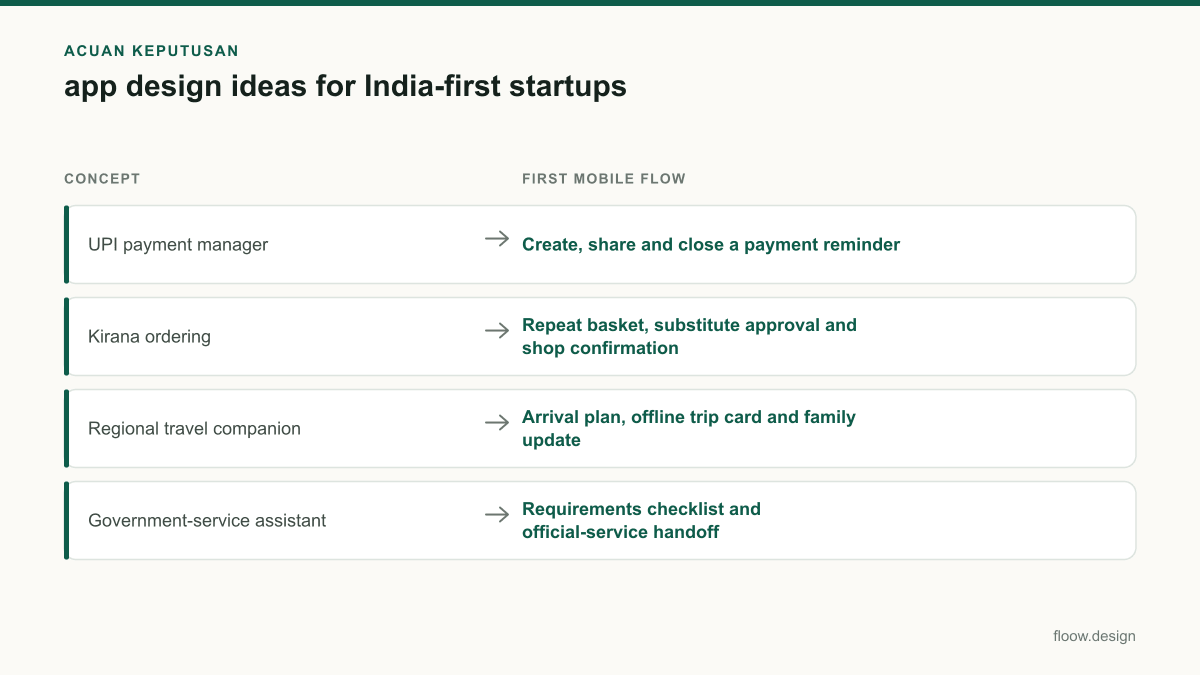
| Concept | First mobile flow | India-specific touchpoint | Language requirement |
|---|---|---|---|
| UPI payment manager | Create, share and close a payment reminder | UPI and WhatsApp sharing | Hindi plus the user’s chosen regional language |
| Kirana ordering | Repeat basket, substitute approval and shop confirmation | WhatsApp commerce and ONDC-aware ordering | Hindi plus local product terms in a regional language |
| Regional travel companion | Arrival plan, offline trip card and family update | WhatsApp itinerary sharing | Hindi plus the destination’s relevant regional language |
| Government-service assistant | Requirements checklist and official-service handoff | UMANG and official service destinations | Hindi plus the user’s relevant regional language |
Common mistakes
Adding UPI as a generic payment button without explaining what happens after the user leaves the app.
Use explicit states such as request created, payment pending and payment confirmed. Keep the UPI handoff distinct from your app’s own confirmation screen.
Treating WhatsApp as a marketing channel instead of a task-completion path.
Generate a structured, readable order summary or trip update that the recipient can act on, then return users to the app for status.
Translating interface strings after the English layout is fixed.
Test Hindi and regional-language versions during wireframing. Allow for longer labels, local scripts, regional terminology and script-choice preferences.
Making a government-assistance product look like an official authority.
Name the official destination, explain the handoff and avoid promises about eligibility, approval or application outcomes.
Frequently asked questions
What are useful app design ideas for India?
Useful app design ideas for India solve frequent local coordination tasks: a UPI payment reminder manager, a kirana ordering flow with substitution approval, a regional travel last-mile planner, or a government-service preparation assistant. Each should support Hindi and relevant regional languages, and can use WhatsApp sharing where it helps users complete the task.
What mobile app problems are unique to India?
India-specific mobile app problems often arise at the intersection of UPI payments, neighbourhood retail, multilingual communication and public-service navigation. Examples include confirming a kirana substitute through WhatsApp, coordinating shared UPI requests, understanding regional travel arrival details, and preparing documents before using an official government-service portal.
How do I validate an app idea in India?
Validate an app idea in India by prototyping one complete mobile task, testing it with the intended users in Hindi and a relevant regional language, and observing where they stop. For a kirana app, test basket creation, substitution approval and shop confirmation. Share the flow through floow.design and interview both customers and retailers.
Should an India-first app support WhatsApp?
An India-first app should support WhatsApp when users already use it to coordinate the task, such as sharing a kirana order, sending a payment reminder or updating family during travel. Use it for a structured handoff, not as a replacement for clear in-app states, consent and order details.
Where this leaves you
The best India-first concepts make a familiar offline or message-based task easier to finish on a phone. Pick one narrow workflow, design it in Hindi and the relevant regional language, include UPI, ONDC or WhatsApp only where useful, and turn it into a shareable floow.design screen flow before building the product.
Design the screens first
Describe the app in plain language and floow.design draws the iOS and Android screens for you, ready to refine and hand off.
Sources
Design your mobile app with AI.
Generate pixel-perfect iOS and Android screens in seconds, then export to Figma or code.
You might also like…
 Roundups20 September 2026ui design inspiration from Indian mobile appsStudy ui design inspiration from PhonePe, CRED, Meesho, Swiggy, Kite and MakeMyTrip through Indian tasks, Android and multilingual patterns.By floow.design Team, Mobile Design
 Roundups20 September 2026ui ux portfolio examples for India rolesExplore India-focused mobile app portfolio projects using UPI, COD, OTP, local addresses and Hindi or regional-language flows recruiters can assess.By floow.design Team, Mobile Design
 Guides20 September 2026Travel app design for Indian travellersDesign Indian travel booking screens for rail, buses, flights and stays with passenger details, PNR, UPI, GST invoices and cancellations.By floow.design Team, Mobile Design