
app prototype for Indian mobile user testing
Plan an Indian mobile app prototype for UPI, OTP, addresses and language variants. Run usability testing on representative Android devices before build.

An app prototype for India should test the journeys most likely to fail before development: UPI payment states, OTP verification, Indian address entry and multilingual content. Build these as connected mobile screens, then run usability testing with Android users across language groups and city tiers. Use floow.design to turn the critical flow into a testable multi-screen concept before production design.
Key takeaways
- •Prototype UPI, OTP, Indian address and language-switching flows before visual polish.
- •Recruit Indian participants by preferred language and city tier, not only by age or job title.
- •Test on Android devices that reflect India’s price-sensitive smartphone market.
- •Use realistic failure, delay and retry states for payments and verification.
What's on this page
- •Start with the Indian journeys that change the screen flow
- •Set the right fidelity for usability testing
- •Recruit for language and city-tier differences
- •Test on representative Android phones, then decide what to build
Watch: Mobile App Design Tutorial in Figma (Free Course!)
Video by Pierluigi Giglio, embedded from YouTube.
Start with the Indian journeys that change the screen flow
For an Indian mobile product, an app prototype should begin with task risk rather than the home screen. Prioritise UPI, OTP, Indian address and multilingual flows because each changes what users must see, enter and recover from.
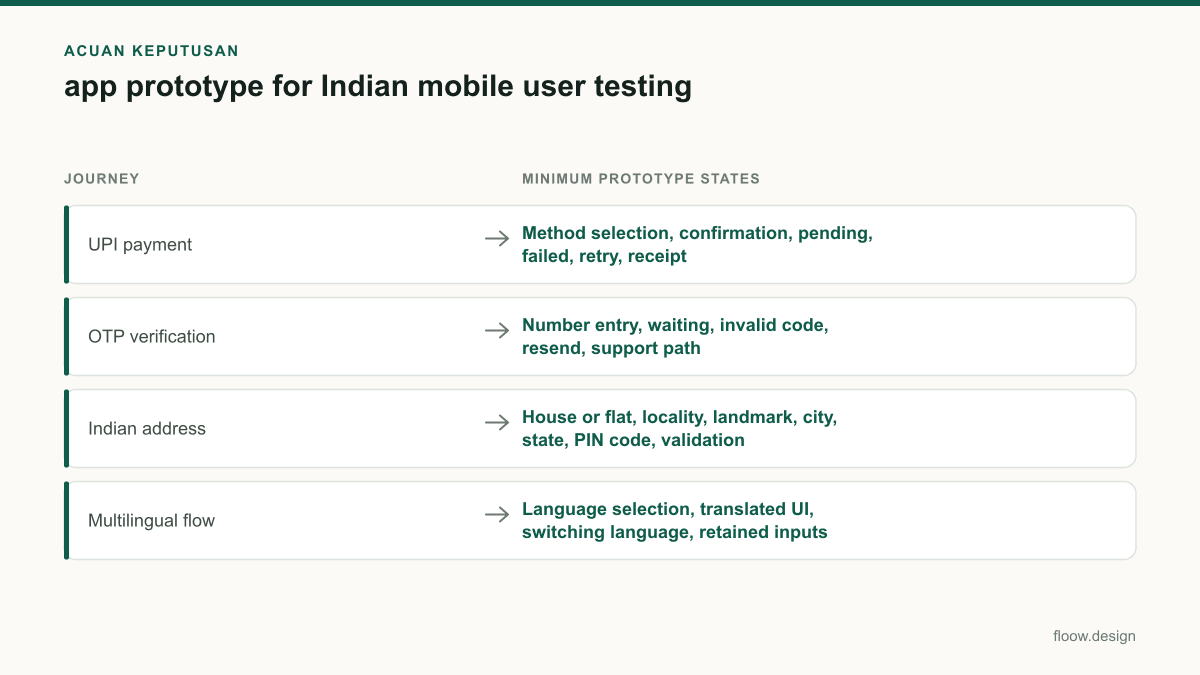
For UPI, prototype account or handle selection, payment confirmation, pending status, failure, retry and receipt. Do not make payment succeed automatically: a participant needs to understand what happens when a transaction is pending or cannot be completed. UPI is operated by the National Payments Corporation of India, so use recognisable payment language without copying another app’s interface or implying a bank integration you do not have. NPCI is the authoritative starting point for UPI context.
For OTP verification, include number entry, the waiting state, incorrect-code feedback, resend and an alternative support path. For address entry, test Indian conventions such as house or flat number, street or locality, landmark, city, state and PIN code. If the product serves more than one language, prototype language choice, translated labels and what happens to partially entered data after a language switch.
Set the right fidelity for usability testing
A testable prototype does not need production code, but it must behave credibly at decision points. In figma mobile app design, connect every tap needed to complete the task and write realistic field labels, validation messages, payment outcomes and OTP states. A static set of polished screens can hide the very problems Indian users will encounter in a live journey.
Use lower fidelity for early navigation questions: which payment method users expect, where language selection belongs, or whether an address form asks for too much. Move to high-fidelity screens when testing readability, keyboard overlap, error placement, transaction status and confidence at the payment confirmation step.
Keep data fictional and clearly labelled for research. Never ask participants to enter a real OTP, UPI PIN, bank credential or other sensitive information into a prototype. The Reserve Bank of India publishes official consumer and payment-system information at RBI; use official guidance to review payment terminology and safety expectations, then keep your study focused on interface comprehension rather than collecting financial data.
Recruit for language and city-tier differences
Indian validation is weak if every participant uses the same language, device class and urban context. Recruit Indian participants across language and city-tier segments: for example, include people who primarily use English alongside users who prefer the regional language your product supports, and include participants from metro, tier-2 and tier-3 cities where the service is intended to operate.
Ask screening questions that affect the flow: Android device model and age, preferred app language, frequency of digital payments, comfort receiving OTPs, and whether deliveries or services are commonly found through landmark-based addresses. These are useful behavioural criteria; avoid treating city tier as a shortcut for digital ability.
Run the same core scenario with each segment: add an address, verify a number, make a simulated UPI payment and recover from a pending payment. Compare task completion, hesitation, wrong taps and the language participants use to explain the problem. The Government of India’s language resources are available through Bhashini, which is useful context when planning multilingual product experiences.
Test on representative Android phones, then decide what to build
Use Android devices representative of India’s price-sensitive smartphone market rather than validating only on a recent flagship phone. The prototype should be checked on smaller displays, ordinary touch responsiveness, lower-brightness viewing and the Android keyboard behaviour users are likely to encounter. This matters when a payment sheet, OTP field or long address form is open: key actions can fall below the fold or become hard to reach.
During usability testing, give participants a goal, not instructions such as “tap UPI.” For example: “Pay this order and show me how you would know whether it went through.” Observe whether they recognise a pending state, wait for confirmation or attempt duplicate payment. Then repeat with an OTP delay and an address validation error.
Record findings as specific design decisions: shorten an address form, expose the language control earlier, clarify a UPI pending message or preserve entered details after an OTP retry. Use floow.design to create a rapid, testable multi-screen prototype concept before investing in production design. It is the right handoff when the flow is defined but engineering requirements are not yet fixed.
Indian mobile prototype test matrix
| Journey | Minimum prototype states | Participant coverage |
|---|---|---|
| UPI payment | Method selection, confirmation, pending, failed, retry, receipt | Participants with varying familiarity with digital payments |
| OTP verification | Number entry, waiting, invalid code, resend, support path | Android users across language preferences and city tiers |
| Indian address | House or flat, locality, landmark, city, state, PIN code, validation | Participants from the intended delivery or service locations |
| Multilingual flow | Language selection, translated UI, switching language, retained inputs | Users who prefer each supported language |
Common mistakes
Showing only a successful UPI payment path.
Prototype pending, failed and retry states, then test whether users understand whether money has moved.
Using a generic global address form.
Include locality, landmark, state and PIN code where the product needs them, and test the form with Indian addresses.
Recruiting only English-speaking metro users.
Set quotas across supported languages and city tiers, then compare the same task across those groups.
Reviewing the prototype only on a flagship phone.
Test connected screens on representative Android devices from India’s price-sensitive smartphone market.
Frequently asked questions
What should an app prototype include in India?
An app prototype in India should include connected mobile screens for the product’s highest-risk local journeys: UPI payment states, OTP verification, Indian address entry and multilingual content where supported. It should also show errors, pending states, retries and confirmation messages, then be tested with Indian Android users across language and city-tier segments.
Can I test UPI flows in a prototype?
Yes, you can test UPI flows in a prototype without processing a real payment. Create screens for method selection, payment confirmation, pending status, success, failure and retry. Ask participants to complete a realistic purchase task and explain what they believe happened. Do not collect a real UPI PIN, OTP, bank credential or payment account information.
How detailed should a mobile app prototype be?
A mobile app prototype should be detailed enough for a participant to complete the target task without moderator guidance. For Indian payment, verification and address journeys, that means connected screens, realistic labels, keyboard-aware forms, validation feedback and recovery states. Use simpler screens for early navigation tests, then increase fidelity before testing comprehension, trust and errors.
Which devices should I use for Indian prototype testing?
Use Android devices representative of India’s price-sensitive smartphone market, not only a current flagship device. Check the prototype on smaller screens and with normal Android keyboard behaviour, especially for OTP, UPI and address forms. Device coverage should reflect the audience you plan to serve, alongside recruiting participants across language and city-tier segments.
Where this leaves you
Before committing to production design, turn UPI, OTP, Indian address and multilingual journeys into connected screens and test them with the Android users you intend to serve. floow.design helps teams create that rapid multi-screen prototype concept so evidence, not assumptions, drives the build.
Design the screens first
Describe the app in plain language and floow.design draws the iOS and Android screens for you, ready to refine and hand off.
Sources
Design your mobile app with AI.
Generate pixel-perfect iOS and Android screens in seconds, then export to Figma or code.
You might also like…
 How-to20 September 2026user research methods for Indian mobile appsChoose research methods for Indian mobile apps across metro, tier-2 and tier-3 users, regional languages, device constraints and payment journeys.By floow.design Team, Mobile Design
 How-to20 September 2026Usability testing with Indian mobile usersPlan usability testing across India’s city tiers, languages, devices and networks. Test UPI, OTP and PIN-code flows safely before development.By floow.design Team, Mobile Design
 How-to20 September 2026ui ux design process for Indian mobile appsA practical ui ux design process for Indian mobile apps: research across languages and city tiers, design UPI and OTP flows, and plan consent.By floow.design Team, Mobile Design