
payoneer pakistan: better freelancer payout UX
A Pakistan-focused case study for finance apps: design payout status, PKR conversion, fee disclosure, and withdrawal guidance for freelancers.

For payoneer pakistan, a freelancer payout app should make three things visible before a withdrawal is confirmed: the received currency, the PKR amount the user will get, and the current transfer status. Design separate received, conversion, fee, and bank-withdrawal states so Pakistani freelancers can verify what happened without contacting support.
Key takeaways
- •Show the incoming amount, conversion rate, fees, and final PKR estimate before the user commits to withdrawal.
- •Treat payout status as a sequence of named states, not a spinner or a generic “processing” label.
- •Keep international receipt and local bank withdrawal as distinct steps with their own confirmations and help actions.
- •Use floow.design to generate focused mobile screens for conversion review, payout tracking, and exception handling.
What's on this page
- •Case study: turn a payout journey into visible decisions
- •Design the conversion screen as a receipt before it is a calculator
- •Make payout status operational, not decorative
- •Screen set to generate in floow.design
Case study: turn a payout journey into visible decisions
Payoneer serves users in Pakistan for international payment receipt and withdrawal workflows. That journey is useful input for a local finance app because it contains two different user jobs: confirming money has arrived from an overseas client, then deciding when and where to withdraw it.
For freelancing in Pakistan, do not collapse those jobs into one “Balance” screen. Start with a received-payment card: payer or marketplace label, amount, currency, arrival time, and a clear state such as Received or Under review. From that card, let the user open a withdrawal flow rather than making the balance itself look immediately spendable.
The withdrawal review screen should answer four questions in order: What amount is being withdrawn? What exchange rate is being applied? What fees affect the outcome? What final amount is estimated in PKR, Pakistan’s currency? Put the primary action below this summary, not above it. This structure makes uncertainty explicit and gives the user a moment to stop before a cross-border payment becomes a local-bank withdrawal. Payoneer’s official site describes its payment and withdrawal services for global businesses and professionals (Payoneer).
Design the conversion screen as a receipt before it is a calculator
A conversion screen should show both currencies when an international amount becomes a local withdrawal. Lead with the source amount and currency, then show the applied conversion rate, any stated fee line, and the estimated destination amount in PKR. Avoid presenting only a large PKR number: freelancers need to reconcile it with what an overseas client sent.
A practical mobile hierarchy is:
- •You withdraw: USD amount or other received currency.
- •Conversion rate: include the rate’s effective time or availability label when your product has one.
- •Fees: show each applicable fee as its own row; never hide it inside the rate.
- •You receive: estimated PKR amount.
- •Destination: masked bank-account identity and expected processing state.
If the value can change before completion, say “estimated” beside the PKR result and explain the trigger in plain language. Do not invent certainty with a fixed-looking total. In app design, this is a trust screen: the user is checking whether the conversion and withdrawal outcome match their expectation, not admiring a dashboard.
Pakistan’s banking and payment system is regulated by the State Bank of Pakistan, so a local finance product should also give users clear, non-promotional help routes for payment or account questions rather than implying that a screen alone resolves a regulated-service issue (State Bank of Pakistan).
Make payout status operational, not decorative
Status needs its own screen because a freelancer asking “where is my money?” needs an explanation and a next action. Use a vertical event trail with one current state and completed prior states: Payment received, Available to withdraw, Withdrawal requested, Conversion confirmed, Sent to bank, and Completed. Only display states your system can support; an honest smaller set is better than a fictional timeline.
Each current state needs three pieces of content: a plain-language description, the last update time, and an action. For example, a withdrawal that needs attention should state what information is needed and provide Review details or Contact support. A completed withdrawal should retain the amount, currency pair, final PKR outcome, destination bank mask, and reference identifier as a shareable receipt.
Do not use green for every non-error state. “Received” can be neutral, “Action needed” should be prominent, and “Completed” earns positive confirmation. Reserve warning styling for genuine uncertainty or a user task. This reduces support demand while preventing a common finance-app failure: a reassuring visual treatment that conceals an unresolved payment state.
Generate these status variants as a connected mobile flow in floow.design: received payment, conversion review, withdrawal pending, action needed, and completed receipt.
Screen set to generate in floow.design
Use floow.design to produce a compact, testable payout flow rather than a generic wallet concept. Start with a Payment received screen that separates available and unavailable funds. Follow it with a Withdraw to bank review that shows the original currency, conversion rate, fee rows, final estimated PKR amount, and masked destination account.
Next, generate a Payout status screen with a chronological event trail and a visible current state. Include an exception version for missing details or review, where the interface explains the issue without making claims about timing. Finish with a Completed withdrawal receipt that preserves the source amount, conversion outcome, final PKR amount, reference, and support entry point.
Give the generator content constraints, not vague visual adjectives: “mobile finance screen; show USD source amount and PKR destination estimate; fee disclosure above confirmation; status timeline with timestamps; one primary action; accessible contrast; plain English.” Then test whether a freelancer can answer three questions at each step: how much arrived, what will reach the bank in PKR, and what must happen next. If any answer requires opening a help article, the screen hierarchy needs another pass.
Pakistan payout-flow reference for mobile finance screens
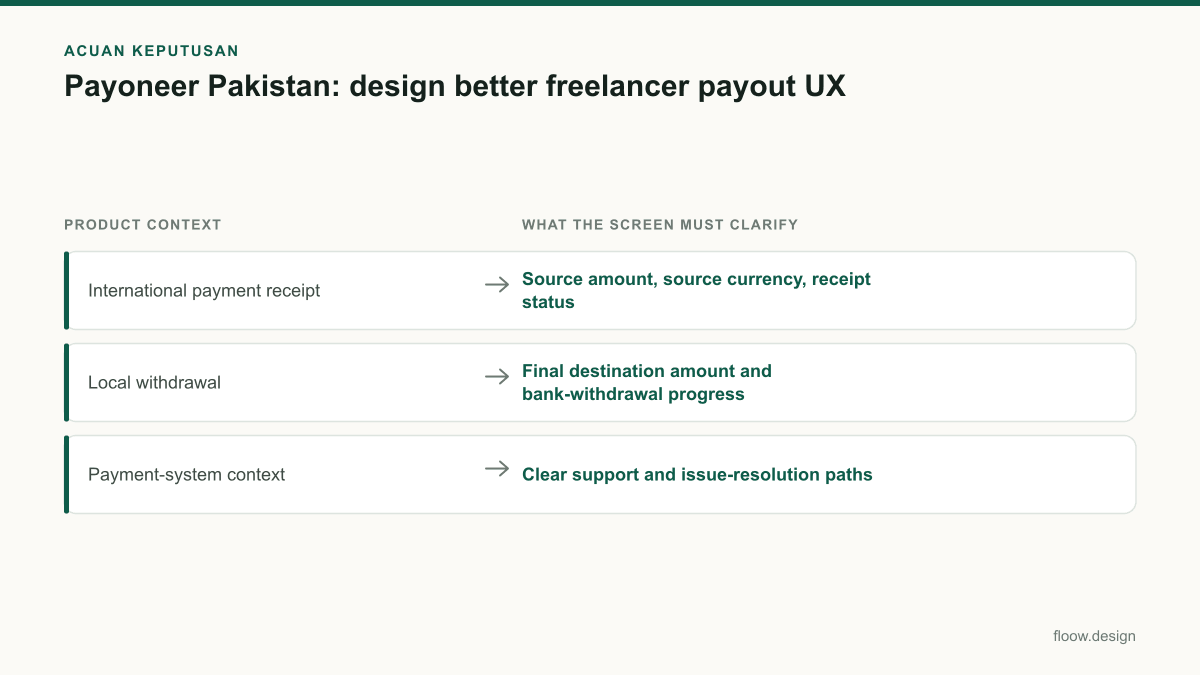
| Product context | What the screen must clarify | Local reference |
|---|---|---|
| International payment receipt | Source amount, source currency, receipt status | Payoneer serves users in Pakistan for international payment receipt workflows. |
| Local withdrawal | Final destination amount and bank-withdrawal progress | Present the destination amount in PKR. |
| Payment-system context | Clear support and issue-resolution paths | The State Bank of Pakistan regulates Pakistan’s banking and payment system. |
Common mistakes
Showing a converted total without the original currency amount.
Place the received USD or other source-currency amount above the PKR estimate so users can reconcile the withdrawal.
Using one vague “Processing” status for the entire journey.
Split receipt, withdrawal request, conversion, bank transfer, and completion into system-backed states with timestamps.
Hiding fees in a small note or embedding them in an unexplained rate.
Show fee rows and the conversion rate in the confirmation hierarchy before the withdrawal action.
Making an exception screen look like a completed transfer.
Use explicit action-needed language, explain the required user step, and offer a relevant support route.
Frequently asked questions
How should a Payoneer Pakistan payout screen be designed?
A Payoneer Pakistan payout screen should separate international payment receipt from local-bank withdrawal. Show the received amount and currency first, then the exchange rate, disclosed fees, estimated PKR outcome, masked destination account, and a named payout status. Include an event trail and a clear support action for withdrawals that need user attention.
Should conversion values show PKR and USD?
Yes. A Pakistan-focused cross-border payout screen should show the source amount in USD or the received currency alongside the final or estimated amount in PKR. This lets freelancers compare what an overseas client paid with what reaches their local bank. Show the applied rate and any fee rows between those two values.
What status information do freelancers need?
Freelancers need the current payout state, the last update time, completed prior steps, the amount and currency involved, and the next action if something is required. Useful states include payment received, available to withdraw, withdrawal requested, sent to bank, completed, and action needed. Avoid unexplained generic processing labels.
Why should fee disclosure appear before withdrawal confirmation?
Fee disclosure belongs before withdrawal confirmation because the user’s decision depends on the final amount expected in PKR, not only the amount received in a foreign currency. List the source amount, conversion rate, each applicable fee, and estimated destination amount together. This makes the confirmation screen a verifiable transaction summary.
Where this leaves you
For a Pakistan-focused payout experience, trust comes from visible evidence: the received currency, the PKR outcome, fee lines, and an honest status trail. Generate transparent payout-status and conversion screens in floow.design, then test them against the moments when a freelancer needs to verify an amount or explain a delay.
Design the screens first
Describe the app in plain language and floow.design draws the iOS and Android screens for you, ready to refine and hand off.
Sources
Related reading
Design your mobile app with AI.
Generate pixel-perfect iOS and Android screens in seconds, then export to Figma or code.
You might also like…
 Insights20 September 2026Freelancing in Pakistan: Mobile UI Design GuideBuild a focused mobile UI design service, price screens for local and USD clients, manage PKR cash flow, and prepare proposals with floow.design quickly.By floow.design Team, Mobile Design
 Insights20 September 2026Careem Pakistan: ride app design lessonsA case study of Careem Pakistan ride flows: pickup pins, PKR fare estimates, driver coordination, safety states, and screens to generate in floow.design.By floow.design Team, Mobile Design
 Guides20 September 2026UI of website to mobile app: Pakistan handoffTurn a Pakistani service website into focused app screens: map core journeys, use PKR checkout patterns, and prepare a practical handoff for floow.design.By floow.design Team, Mobile Design