
Login screen design for Pakistani apps
Design a trusted Pakistani mobile login UI with +92 and 03xx handling, resilient SMS OTP states, privacy controls and finance-ready security paths.

Login screen design for Pakistani apps should make phone-first access easy while protecting shared-device privacy: accept both +92 and 03xx numbers, normalize them to one account format, and show OTP, resend, expiry and change-number states. For wallet or banking flows, use controls consistent with State Bank of Pakistan expectations for secure digital and branchless banking.
Key takeaways
- •Accept +92 3xx… and local 03xx… input, then normalize both to the same stored Pakistani mobile number.
- •Keep the first mobile login UI to one task: enter a number, confirm the masked destination, and request an OTP.
- •Build failure states for delayed SMS: resend timing, code expiry, editing the number and an alternative verified recovery route.
- •Do not expose a full phone number in notifications, recent screens or OTP confirmation copy on a potentially shared device.
- •Financial apps need a stronger path than retail sign-in: device binding, biometric re-entry and recovery controls should follow applicable State Bank of Pakistan security expectations.
What's on this page
- •Start with a Pakistani phone-number entry that recovers gracefully
- •Make the OTP login screen reliable, not optimistic
- •Apply a higher security bar to wallets and banking
- •Create a four-screen mobile login UI system
Start with a Pakistani phone-number entry that recovers gracefully
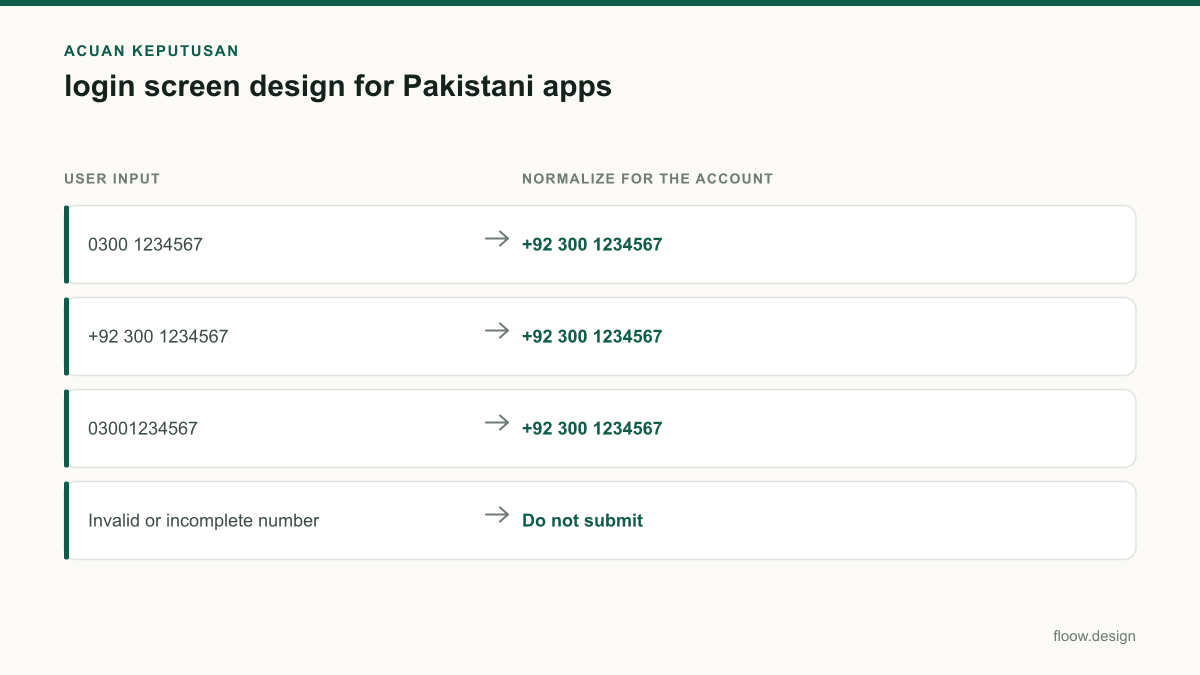
A Pakistani phone number login should accept the two formats people actually type: 03xx xxx xxxx and +92 3xx xxx xxxx. Do not make a customer decide which format your database expects. Strip spaces and punctuation, convert a leading 0 to +92, then display the normalized result back for confirmation. A user entering 0300 1234567 should see a confirmation such as “We’ll send a code to +92 300 ••• 4567.”
Use a numeric keypad, put +92 in a visible country selector or prefix control, and do not prefill a leading zero after the country code. Explain errors in actionable language: “Enter an 11-digit mobile number beginning with 03” is more useful than “Invalid number.” Preserve the entered digits when validation fails, especially after a network interruption.
This pattern fits the phone-first access users encounter in JazzCash, Easypaisa and Daraz Pakistan. Those references set an expectation that a mobile number can identify the account, but your screen still needs to say what happens next: SMS code, password, or an existing-device approval. For personal data handling, collect only the number needed to begin sign-in and mask it everywhere after submission.
Make the OTP login screen reliable, not optimistic
An OTP login screen needs explicit states, not just six empty boxes. After the code request, show the masked destination, a visible expiry countdown, a disabled resend control that becomes available at the appropriate time, and a clear Change number action. If the code expires, keep the entered code visible long enough to explain why it cannot be used, then offer a fresh request. Do not silently issue repeated SMS messages; this creates confusion and can increase interception risk.
Keep copy specific: “Code sent to +92 300 ••• 4567” avoids revealing the full number on a shared phone. Avoid putting the full number in push notifications, screen previews or lock-screen-visible messages. Allow paste, support automatic focus movement between fields, and make the submit action available when all digits are present. If automatic SMS reading is used, obtain the relevant platform permission only where required and retain a manual entry path.
When an SMS does not arrive, first offer practical checks—wait for the resend timer, verify the mobile number, and request another code—then provide a support or account-recovery route that does not reveal whether an arbitrary number has an account. Treat a changed SIM, lost device and inaccessible number as distinct recovery cases rather than forcing users into an endless resend loop.
Apply a higher security bar to wallets and banking
For a retail marketplace, an OTP may be a reasonable first-session proof of phone possession. For a wallet, branchless-banking product or digital-banking app, authentication must reflect the risk of balances, transfers and profile changes. State Bank of Pakistan publishes frameworks and guidance relevant to digital banking and branchless banking; product teams should map login, device enrolment, transaction approval, recovery and support operations to the requirements applicable to their institution and service. See the State Bank of Pakistan’s official site: sbp.org.pk.
In the mobile login UI, distinguish initial enrolment from returning access. After a verified first login, offer device-bound biometric re-entry where the operating system supports it, but retain a protected fallback. A biometric prompt is not an account-recovery method: if biometrics fail or the device changes, step up verification without disclosing sensitive account details.
For higher-risk events—new-device access, number change, credential reset or attempts following repeated OTP failures—show clear status, slow abusive retries and route the user to a verified recovery flow. Never imply that SMS alone gives the same assurance as every financial action requires. The right controls depend on the regulated product and the institution’s approved risk policy.
Create a four-screen mobile login UI system
Design the journey as connected screens rather than a single sign-in form. Screen one is the phone entry view with +92 or 03xx handling, inline validation and a concise consent note. Screen two is OTP entry with masked-number confirmation, timer, resend and Change number. Screen three is the biometric prompt shown only after an established device relationship, with a “Use another method” route. Screen four is recovery, separating “I changed my number,” “I no longer have this device,” and “I did not receive a code.”
Keep layout stable between states. If an OTP is wrong, place the message near the code field without shifting the keypad target or erasing every digit. If a number is invalid, return to the entry screen with the original input intact. Test with slow or absent SMS delivery, duplicate taps on resend, pasted codes, app restarts and a device handed to another person.
Generate phone, OTP, biometric-prompt and recovery screen states in floow.design for a complete local login journey. Use one shared component set for country prefix, masked-number text, timer, error message and primary action so the mobile login UI remains consistent across all paths.
Pakistani phone-entry rules for a mobile login UI
| User input | Normalize for the account | What the interface should do |
|---|---|---|
| 0300 1234567 | +92 300 1234567 | Accept spaces; retain the typed value until successful validation. |
| +92 300 1234567 | +92 300 1234567 | Accept the international form without asking the user to remove the prefix. |
| 03001234567 | +92 300 1234567 | Normalize the local leading zero to +92 after validation. |
| Invalid or incomplete number | Do not submit | Explain the expected 03xx or +92 3xx pattern and keep entered digits visible. |
Common mistakes
Forcing users to enter only the international format.
Accept both +92 and 03xx patterns, then normalize internally to a single canonical format.
Showing the complete number on the OTP screen or in notification copy.
Mask the middle digits after submission, for example +92 300 ••• 4567, to reduce shared-device exposure.
Providing only a resend link when an OTP fails.
Include expiry, resend timing, Change number and a verified recovery path for inaccessible numbers or devices.
Treating wallet login as equivalent to a low-risk shopping login.
For financial products, use risk-based device, biometric and recovery controls aligned with applicable State Bank of Pakistan digital-banking and branchless-banking expectations.
Frequently asked questions
Should a Pakistani app use phone number login or email login?
A Pakistani app should usually prioritize phone number login when the service is mobile-led, delivery-dependent or wallet-adjacent, because users commonly recognize their 03xx number immediately. Keep email as an optional recovery or communication channel when useful. For financial products, choose authentication based on risk and applicable State Bank of Pakistan requirements, not convenience alone.
How should I format a +92 login field?
A +92 login field should accept both +92 3xx xxx xxxx and local 03xx xxx xxxx input. Show a visible +92 prefix or country selector, use a numeric keypad, tolerate spaces and hyphens, and normalize a local leading 0 to +92 after validation. On the next screen, display only a masked version of the number.
How long should an OTP login code remain valid?
An OTP login code should remain valid only for a short, clearly displayed period chosen by the product’s security policy and risk level. Show the countdown on the OTP screen, invalidate the code when it expires, and let the user request a new one after a controlled resend interval. Financial apps should set this with their approved security controls.
What should happen if an SMS OTP does not arrive?
If an SMS OTP does not arrive, the app should show the masked destination number, a resend timer, a Change number action and a route to verified account recovery. Preserve the user’s progress, prevent uncontrolled resend attempts, and do not reveal whether another phone number has an account. For financial services, escalate recovery according to the institution’s security process.
Where this leaves you
A trustworthy Pakistani sign-in flow accepts the way people enter numbers, anticipates unreliable SMS delivery and protects account details on shared devices. Build the phone, OTP, biometric and recovery states together in floow.design, then test every transition under real failure conditions before shipping.
Design the screens first
Describe the app in plain language and floow.design draws the iOS and Android screens for you, ready to refine and hand off.
Sources
- •State Bank of Pakistan
- •JazzCash official website
- •Easypaisa official website
- •Daraz Pakistan official website
Related reading
Design your mobile app with AI.
Generate pixel-perfect iOS and Android screens in seconds, then export to Figma or code.
You might also like…
 How-to21 September 2026Splash screen design for Pakistani mobile appsDesign a fast Android-first splash screen for Pakistani apps: bilingual Urdu-English lockups, offline launch assets and clear startup handoff.By floow.design Team, Mobile Design
 How-to21 September 2026Form design for Pakistani payment appsBuild mobile payment forms for Pakistan with CNIC masks, +92 and 03xx phone handling, PKR amounts, and Raast, JazzCash, and Easypaisa choices.By floow.design Team, Mobile Design
 How-to20 September 2026Wireframe a Pakistani mobile payment flowLearn how to wireframe Pakistani transfer, cash-out and bill-payment screens with Raast IDs, wallet choices, error states and local user personas.By floow.design Team, Mobile Design