
Onboarding screen ideas for Pakistani wallets
Design wallet onboarding for Pakistan: explain transfers and Raast first, then hand users to a separate CNIC and regulated KYC journey.

An effective onboarding screen for a Pakistani wallet explains the first useful action—sending, receiving, or paying—before asking for identity details. Use JazzCash and Easypaisa as familiar reference points for wallet activation and transfer education, introduce Raast ID linking for instant bank-to-bank transfers, and keep CNIC verification in a distinct regulated KYC handoff.
Key takeaways
- •Lead with the wallet job, not the registration form: send money, receive money, pay, or transfer to a bank account.
- •Treat product education and regulated identity verification as two connected but separate stages in the app onboarding flow.
- •Explain Raast in task language: link a Raast ID, then send or receive instant bank-to-bank transfers.
- •Localize by audience evidence: Urdu needs RTL layouts; English and Roman Urdu can serve users who read those variants more comfortably.
- •Use floow.design to generate an education-first wallet onboarding flow and a separate KYC handoff sequence.
What's on this page
- •Start with the wallet outcome, not the KYC form
- •Make Raast a transfer choice users can understand
- •Separate education from regulated branchless-banking KYC
- •Build the flow in floow.design
Start with the wallet outcome, not the KYC form
A Pakistani wallet onboarding sequence should establish value in the first two or three screens. Open with a concrete promise: send money to a mobile number, receive money, or pay from your wallet. Then show a short visual of the action and a single primary button such as “Get started.” Do not make the first screen a dense CNIC capture form.
JazzCash and Easypaisa are useful local reference points because many users already understand the basic category: activate a wallet, add or receive funds, and transfer money. Your screens do not need to imitate either product. Instead, use that familiar mental model to explain what happens next: create an account, choose a transfer method, and complete verification when the selected capability requires it.
Keep claims precise. “Send money in a few steps” is a product explanation. “Verify your identity to unlock eligible wallet services” is a compliance handoff. Combining both into one overloaded page makes the wallet feel bureaucratic before users understand why they installed it.
Make Raast a transfer choice users can understand
Raast belongs in education when your product supports bank-to-bank transfers or a Raast ID. Do not introduce it as infrastructure. Frame it as a user task: link a Raast ID to receive money using an easy identifier, or send an instant bank-to-bank transfer without teaching payment-rail terminology first.
A practical sequence is: first screen, “Move money your way”; second screen, “Send to a bank account or Raast ID”; third screen, “Link your Raast ID so people can pay you using your mobile number or another supported identifier.” Place a “Learn more” link near the Raast explanation rather than forcing every user through a tutorial.
The State Bank of Pakistan describes Raast as Pakistan’s instant payment system. That supports a clear expectation-setting line in the UI: transfers are instant when the relevant service and recipient route are available. Avoid absolute copy such as “always instant” unless the product can honestly guarantee that outcome. Use status feedback after the transfer, not a long pre-transfer explanation.
Separate education from regulated branchless-banking KYC
Lightweight onboarding answers, “What can I do here?” KYC onboarding answers, “What identity information is needed for this regulated service?” They should be separate states in the interface, even if the user moves between them in one session.
For branchless-banking flows regulated by the State Bank of Pakistan, design CNIC and identity checks as a dedicated handoff after users have seen the wallet’s value. Explain the immediate purpose before requesting data: “Verify your CNIC to continue with the wallet service available to your account.” Show progress, document requirements, error recovery, and a safe exit. Never imply that a screen-only tutorial replaces the required verification process.
Language choice also changes the interface, not just its labels. Research may support English, Urdu, or Roman Urdu for different audiences. If you offer Urdu, build the screen in RTL: reverse directional layout, align text appropriately, mirror directional icons where their meaning is directional, and test number, CNIC, and phone-entry fields carefully. Do not merely translate an English LTR layout.
Build the flow in floow.design
Use floow.design to generate two linked mobile app sequences rather than one long registration funnel.
For the first sequence, prompt for an education-first wallet onboarding flow: three screens covering wallet value, money transfer education using familiar JazzCash and Easypaisa category expectations, and an optional Raast ID linking explanation for instant bank-to-bank transfers. Ask for English, Urdu, and Roman Urdu content variants where audience research supports them; require RTL screen layouts for the Urdu variant.
For the second sequence, prompt for a separate KYC handoff: eligibility explanation, CNIC entry, verification status, retry states, support path, and completion state. Mark it as a regulated branchless-banking journey under State Bank of Pakistan rules, so the generated screens leave room for real compliance requirements rather than presenting verification as a cosmetic consent step.
Review generated copy with compliance and operations teams. The design system should share typography, components, and progress patterns across both sequences, while keeping the user’s mental model clear: learn the wallet first, verify identity when the chosen service requires it.
Pakistan wallet onboarding content and layout decisions
| Onboarding moment | Recommended treatment | Local consideration |
|---|---|---|
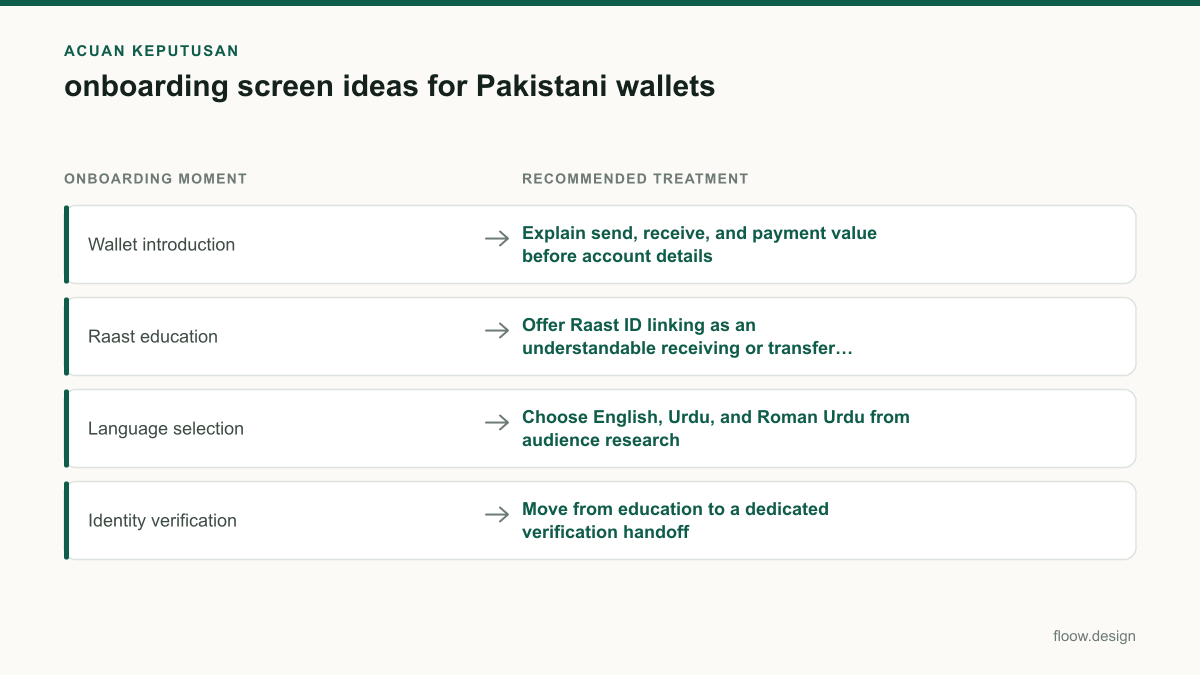
| Wallet introduction | Explain send, receive, and payment value before account details | JazzCash and Easypaisa make wallet activation and money-transfer concepts familiar reference points. |
| Raast education | Offer Raast ID linking as an understandable receiving or transfer option | Describe instant bank-to-bank transfers in user language, not rail terminology. |
| Language selection | Choose English, Urdu, and Roman Urdu from audience research | Urdu interfaces require RTL layouts, including directional hierarchy and icon review. |
| Identity verification | Move from education to a dedicated verification handoff | Branchless-banking KYC must reflect applicable State Bank of Pakistan requirements. |
Common mistakes
Putting CNIC capture on the very first screen.
Show wallet value and the intended action first, then explain why verification is needed before entering the KYC sequence.
Calling Raast a feature without explaining the user benefit.
Use task-led copy such as “Link your Raast ID to receive money” and “Send an instant bank-to-bank transfer.”
Translating English UI into Urdu without changing layout direction.
Create a proper RTL version, including alignment, component order, directional icons, and input-field testing.
Treating all account setup as lightweight onboarding.
Keep product education distinct from the KYC steps required for regulated branchless-banking services.
Frequently asked questions
What should a wallet onboarding screen include?
A wallet onboarding screen should include one clear wallet benefit, a recognizable first action such as sending or receiving money, brief transfer education, and a visible next step. For Pakistan, explain Raast ID linking when relevant and place CNIC collection in a separate KYC handoff rather than mixing identity verification into the first value screen.
How many onboarding screens should a Pakistani app have?
A Pakistani wallet app should usually use two to three lightweight education screens before the user reaches a decision point, followed by a separate KYC sequence when verification is required. The right count depends on product complexity, but each screen should introduce one action or benefit, not repeat marketing copy or combine education with CNIC capture.
Should wallet onboarding explain Raast?
Wallet onboarding should explain Raast when the app lets users link a Raast ID or make Raast-enabled bank-to-bank transfers. Explain it through the user outcome: receive money through a linked identifier or send an instant bank-to-bank transfer. Keep the explanation short and provide optional detail instead of making every user study payment infrastructure.
When should CNIC verification appear in onboarding?
CNIC verification should appear after a Pakistani wallet has explained its core value and when the user reaches a service that requires regulated identity verification. In branchless-banking flows, present CNIC collection as a distinct KYC handoff with purpose, progress, error recovery, and status updates, rather than disguising it as a lightweight introductory screen.
Where this leaves you
Design the first screens to teach the wallet’s everyday value, including transfers and relevant Raast actions. Then move users into a clearly labelled CNIC and KYC handoff when regulated branchless-banking requirements apply. This keeps the app onboarding flow understandable without understating verification.
Design the screens first
Describe the app in plain language and floow.design draws the iOS and Android screens for you, ready to refine and hand off.
Sources
Related reading
Design your mobile app with AI.
Generate pixel-perfect iOS and Android screens in seconds, then export to Figma or code.
You might also like…
 Guides21 September 2026Dashboard design for Pakistani fintech appsDesign a Pakistani fintech dashboard around PKR balances, Raast transfers, bill payments, wallet limits and verification alerts users can act on.By floow.design Team, Mobile Design
 Guides21 September 2026app navigation for Pakistani commerce appsDesign app navigation for Pakistani commerce apps: categories, cash-on-delivery orders, Urdu labels, rider support and trackable delivery states.By floow.design Team, Mobile Design
 Guides20 September 2026ux design research for Pakistani mobile appsPlan ux design research for Pakistani mobile apps: recruit across provinces, test Urdu and English, and validate shared-device and cash flows with users.By floow.design Team, Mobile Design