
app navigation for Pakistani commerce apps
Design app navigation for Pakistani commerce apps: categories, cash-on-delivery orders, Urdu labels, rider support and trackable delivery states.

For Pakistani commerce apps, app navigation should prioritise discovery, categories, orders, support and account actions over a copied retail tab bar. Benchmark Daraz Pakistan for marketplace category and order access, Foodpanda Pakistan for delivery tracking, and Bykea for service and rider-oriented journeys. Make cash-on-delivery orders, landmarks and rider calls easy to reach.
Key takeaways
- •Use navigation around jobs users return to: browse, search, track orders, get help and manage their account.
- •Treat cash on delivery as an order-state and payment-management path, not a hidden checkout-only detail.
- •Offer English and Urdu labels, then test the full right-to-left structure when Urdu is selected.
- •Put tracking close to the order entry point and include practical delivery actions such as rider contact and landmark guidance.
What's on this page
- •Start with Pakistani commerce jobs, not a generic five-tab pattern
- •Make categories and search complementary routes
- •Give cash-on-delivery orders a visible management path
- •Design English and Urdu navigation as separate interface states
- •Put tracking and delivery support inside the order path
Start with Pakistani commerce jobs, not a generic five-tab pattern
Pakistani commerce journeys often move between broad marketplace browsing, repeat delivery, payment confirmation and delivery coordination. Start the information architecture with those jobs: Home, Categories, Search, Orders and Account/Help. A cart can remain persistent in the top bar or as a contextual action rather than consuming a permanent tab.
Benchmark the live product structures before drawing screens. Daraz Pakistan is the useful marketplace reference for category-led discovery and post-purchase order access. Foodpanda Pakistan is a useful reference for food and delivery journeys where users need to return quickly to active orders. Bykea is relevant when the app combines service selection with time-sensitive, rider-oriented fulfilment.
Do not copy any one product’s tab bar. Map each benchmark to a task: finding a department, reopening a recent order, checking a delivery state, contacting support, or switching service type. In floow.design, generate two or three mobile navigation patterns: a marketplace-first structure, an order-first structure and a delivery-first structure. Then compare the number of taps and label clarity for each core task.
Make categories and search complementary routes
For a large catalogue, Categories deserves a first-class route when users browse by department, brand or need. Keep the category landing screen scannable: a short set of high-frequency departments, a clear “All categories” route, and recently viewed or popular paths beneath it. Search should still be globally available because many customers arrive with a specific product, merchant or item name in mind.
A practical ecommerce app navigation layout can use Home for promotions and reorders, Categories for taxonomy, Orders for active and past purchases, and Account for saved addresses, payment preferences and help. If a fifth bottom item is necessary, reserve it for a genuinely frequent action such as Cart—not for a low-use settings area. A floating search entry or top search field is often easier to reach than making Search a tab.
For delivery products, avoid mixing service selection into an undifferentiated category tree. Food ordering, marketplace shopping and ride or courier services have different decision points. Bykea is a useful benchmark for considering service entry separately from an ordinary retail category hierarchy. Test whether users understand the difference between “Shop”, “Deliver”, or another service label before relying on icons alone.
Give cash-on-delivery orders a visible management path
Cash on delivery should appear in the order journey, not only as a payment option at checkout. Daraz Pakistan lists cash on delivery among its available payment methods, so a Pakistani marketplace should reserve clear routes for customers to identify and manage COD orders. See the marketplace’s own payment guidance through Daraz Pakistan.
In the order list, show a concise payment badge such as Cash on Delivery beside the order status. On the order-detail screen, place the amount due, delivery status, delivery address and help action in the first viewport. Do not imply that payment is complete before collection. If a product supports order cancellation, return or delivery changes, expose eligibility and the next action from that same order detail rather than sending users through account settings.
This structure also prevents a common navigation failure: customers opening Cart or Checkout to find a placed order. “Orders” should be a persistent destination, and an active COD order may earn a prominent home-card shortcut. Test an active-order state, a delayed-order state and a delivered state; labels and available actions should change with the actual fulfilment stage.
Design English and Urdu navigation as separate interface states
Pakistani shopping apps should plan English and Urdu labels from the first wireframe. Translation is not just swapping words: when Urdu is the selected interface language, the navigation shell needs right-to-left layout behaviour. Bottom-tab order, back affordances, chevrons, progress direction, icon-and-label alignment, drawers and horizontal carousels all need explicit RTL decisions.
Keep labels short enough for both scripts. Test actual Urdu strings in the bottom navigation UI rather than placeholder text, because wrapping or truncation can make a tab ambiguous. Use familiar task labels over internal business language: orders, help, categories and account must remain understandable at a glance. Icons can support recognition, but should not carry the meaning alone.
Also review mixed-direction content. Product names, prices in PKR, phone numbers, order IDs and addresses may contain Latin letters or numerals inside an Urdu interface. Give these fields stable alignment rules and test them in real order cards. A language switch belongs in Account or onboarding, while the selected language should persist across browsing, checkout, tracking and support. Build English and Urdu prototypes in floow.design, then compare tab recognition and completion speed rather than approving RTL from a static screenshot.
Put tracking and delivery support inside the order path
Order tracking should sit in Orders and open directly from an active-order card on Home. The order-detail page is the operational hub: status updates, expected delivery information, payment method, address, support and any available rider-contact action belong together. This matches local delivery realities better than burying tracking in a generic Help centre.
Support routes should account for rider calls, address landmarks and changing order-status updates used by Pakistani delivery services. Let customers review the delivery phone number and landmark instructions from the active order, with a clearly labelled way to contact support when delivery coordination fails. Avoid making a rider-call button the only help route: a customer may need to correct an address detail, report an issue, or understand a status without calling.
Foodpanda Pakistan is a relevant benchmark for active delivery tracking and support entry, while Bykea helps frame rider-oriented service moments. Use their live apps and services as behavioural references, not visual templates. Ask floow.design for alternate commerce navigation structures, then test category, COD-order and support paths side by side with realistic active-order scenarios.
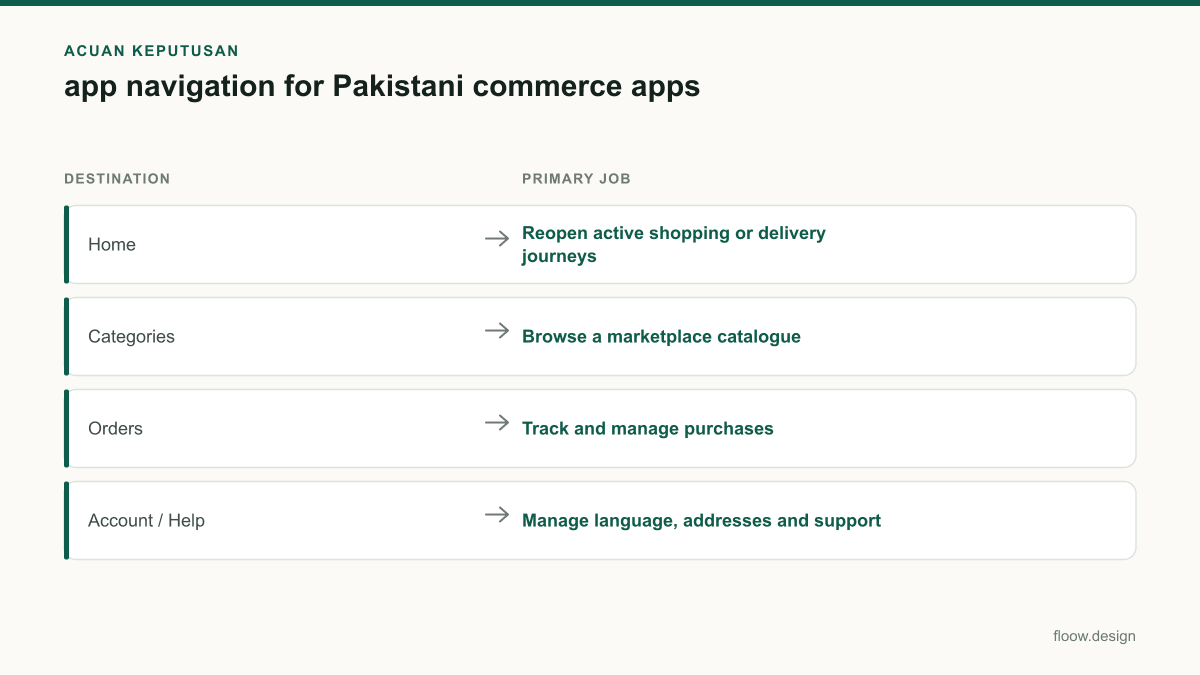
Suggested persistent destinations for a Pakistani commerce app
| Destination | Primary job | Pakistan-specific implementation note |
|---|---|---|
| Home | Reopen active shopping or delivery journeys | Show an active-order card with the latest status and a route to tracking. |
| Categories | Browse a marketplace catalogue | Use a clear department hierarchy; keep service types separate when relevant. |
| Orders | Track and manage purchases | Display Cash on Delivery status and amount due clearly for COD orders. |
| Account / Help | Manage language, addresses and support | Include English/Urdu selection and accessible support for landmark or delivery issues. |
Common mistakes
Copying a Western retail tab bar with a permanent tab for every feature.
Assign persistent destinations only to repeat jobs: discovery, categories, orders and account/help. Keep Cart and Search contextual when they do not justify a tab.
Showing cash on delivery only in the checkout payment selector.
Repeat the COD method and amount due in the order list and order detail so customers can manage a placed order without reopening checkout.
Translating labels into Urdu while retaining left-to-right interaction behaviour.
Prototype a true RTL interface state, including tab ordering, directional icons, chevrons, drawers, progress and mixed Urdu-Latin content.
Hiding tracking and delivery help under a general support menu.
Place tracking, status updates, landmark details and support actions in the active order detail, with a home shortcut for current orders.
Frequently asked questions
What tabs should an ecommerce app navigation have?
An ecommerce app navigation should usually give persistent access to Home, Categories, Orders and Account or Help, with Search and Cart handled contextually when possible. For Pakistani marketplace apps, Orders should be especially easy to reach because it contains tracking, cash-on-delivery details, delivery updates and support actions after checkout.
How should cash on delivery appear in app navigation?
Cash on delivery should appear as a clearly labelled payment badge in the order list and as a prominent detail on the active order screen, including the amount due and delivery status. Pakistani marketplaces such as Daraz Pakistan offer cash on delivery, so customers should not need to return to checkout to confirm how a placed order will be paid.
Should Pakistani shopping apps offer Urdu navigation?
Pakistani shopping apps should consider Urdu navigation alongside English when it serves their audience, but Urdu requires a complete right-to-left interface treatment. Bottom-tab order, back controls, chevrons, carousels, alignment and mixed Urdu-Latin content such as PKR prices and order IDs must be tested as an RTL interface, not merely translated labels.
Where should order tracking sit in a mobile app?
Order tracking should sit in the persistent Orders destination and be reachable from an active-order card on Home. The tracking screen should combine current status, payment method, address, delivery instructions, rider-related contact options where available and support, because Pakistani delivery users may need to handle rider calls, landmarks and status changes during fulfilment.
Where this leaves you
A Pakistani commerce navigation system earns its space by helping people browse, place, track and resolve real orders. Build around categories, active orders, COD clarity, Urdu RTL behaviour and delivery support. Ask floow.design for alternate commerce navigation structures, then test category, COD-order and support paths side by side.
Design the screens first
Describe the app in plain language and floow.design draws the iOS and Android screens for you, ready to refine and hand off.
Sources
Related reading
Design your mobile app with AI.
Generate pixel-perfect iOS and Android screens in seconds, then export to Figma or code.
You might also like…
 Guides21 September 2026Onboarding screen ideas for Pakistani walletsDesign wallet onboarding for Pakistan: explain transfers and Raast first, then hand users to a separate CNIC and regulated KYC journey.By floow.design Team, Mobile Design
 Guides21 September 2026Dashboard design for Pakistani fintech appsDesign a Pakistani fintech dashboard around PKR balances, Raast transfers, bill payments, wallet limits and verification alerts users can act on.By floow.design Team, Mobile Design
 Guides20 September 2026ux design research for Pakistani mobile appsPlan ux design research for Pakistani mobile apps: recruit across provinces, test Urdu and English, and validate shared-device and cash flows with users.By floow.design Team, Mobile Design