
app screens from Pakistani mobile products
Study app screens from Pakistani wallets, shopping, delivery and health products, with local payment, language, address and verification patterns for mobile UI planning.

These app screens reference familiar Pakistani tasks: entering a +92 number, verifying a CNIC, sending PKR through a mobile wallet or Raast, choosing cash on delivery, and tracking a rider to a landmark-based address. Use the patterns as task references for original Pakistani app UI, not as screens to copy.
Key takeaways
- •Start each flow with the local task: wallet transfer, COD checkout, rider contact, CNIC verification, or a health consultation.
- •Expose the payment method and its state early: PKR amount, wallet transfer, Raast option, cash on delivery, pending, successful, or failed.
- •Treat Urdu, English, and Roman Urdu as distinct copy choices; an Urdu interface needs an RTL layout, not only translated labels.
- •Use landmarks, contact controls, and clear order-tracking states because addresses and handoffs are core delivery screens in Pakistan.
What's on this page
- •Wallet onboarding: identity, number, and PKR transfer
- •Marketplace checkout: Daraz Pakistan and cash-on-delivery decisions
- •Delivery screens: Foodpanda Pakistan and Bykea handoff states
- •Health and language screens: Sehat Kahani, Urdu, English, and Roman Urdu
Wallet onboarding: identity, number, and PKR transfer
Wallet flows are the clearest mobile UI examples for high-trust Pakistani tasks. Use JazzCash and Easypaisa as references for the kind of journey users recognise: number entry, account access, identity checks, recipient selection, amount entry, review, and receipt. Both products publicly position mobile financial services in Pakistan; inspect their current public product language before deciding how much explanation your own flow needs (JazzCash, Easypaisa).
A useful original screen set is: Enter mobile number with a fixed +92 prefix; CNIC verification with document and consent guidance; Send money with recipient, PKR amount, and funding method; Review transfer; and transfer status. Keep PKR adjacent to the amount rather than hiding it in a later confirmation. If the product supports a Raast transfer, label it as a payment rail or option in the transfer choice and show a distinct pending, successful, or failed state. Raast is operated under Pakistan’s instant-payment framework at the State Bank of Pakistan (SBP).
Avoid importing a generic card-first banking flow. The screen hierarchy should make mobile-wallet transfer and Raast understandable before secondary options.
Marketplace checkout: Daraz Pakistan and cash-on-delivery decisions
Daraz Pakistan is a useful Pakistani app UI reference for a shopping flow because checkout is not only a payment form. It is a sequence of delivery commitment screens: basket, delivery address, delivery choice, payment choice, order review, and post-purchase tracking. Use the current Daraz Pakistan product as a behavioural reference, not a visual template (Daraz Pakistan).
For an original marketplace flow, give the address screen its own task. Capture recipient name and phone number, then locality details and a nearby landmark field. A landmark such as “near the main gate” should remain visible in the order review because it helps delivery handoff; do not bury it in an expandable note. On payment selection, show Cash on Delivery in full, alongside any wallet or Raast-supported method your product actually offers. The selected method must persist on the review screen, next to the PKR total and delivery destination.
The important gallery lesson is state continuity. After checkout, users should see order placed, seller processing, dispatched, out for delivery, delivered, cancelled, or payment-related exceptions as separate states. An ambiguous progress line is weaker than a screen that says what the buyer can do next.
Delivery screens: Foodpanda Pakistan and Bykea handoff states
Foodpanda Pakistan and Bykea show why delivery products need more than a map. Their familiar categories—food ordering and on-demand transport or delivery—make them useful references for task sequencing and rider coordination (Foodpanda Pakistan, Bykea). Build an app screen flow around the moment a customer needs to act, not around an abstract tracking timeline.
Start with an address picker that keeps the saved location, typed address, and landmark in one reviewable place. Then create an order or ride confirmation screen with total in PKR, selected payment state, and expected next event. If cash on delivery is selected, repeat that choice in the rider-facing handoff summary or customer tracking view; customers should not have to remember whether payment is due at the door.
The tracking screen should change meaningfully by state: rider assigned, rider approaching pickup, order being prepared, rider en route, rider at location, and completed. Add a clear contact rider action only once a rider is assigned, and place the destination landmark near it. A call or chat control without context forces the user to repeat the address. If wallet payment is pending or a Raast transfer requires confirmation, show that separately from the physical delivery status.
Health and language screens: Sehat Kahani, Urdu, English, and Roman Urdu
Sehat Kahani is a relevant health-flow reference because a consultation product must establish care context before it asks users to book, pay, or join a session (Sehat Kahani). An original health screen set can include phone entry with +92, patient details, appointment selection, consultation preparation, payment choice, and post-consultation follow-up. Where identity is required, explain the purpose of CNIC verification plainly and request only what the service genuinely needs.
For language, decide per audience and task. English copy can support familiar product terms: “Enter CNIC number” and “Pay PKR 1,500.” Roman Urdu can reduce formality in reminders or help text: “Apna landmark likhein taake rider aap tak asaani se pohanch sake.” Urdu requires a real right-to-left screen treatment, for example: “اپنا پتہ اور قریبی نشانی درج کریں” for an address prompt. In that RTL version, align text, back navigation, field affordances, and directional icons for right-to-left reading; simply right-aligning English-style rows is not enough.
Keep critical labels consistent across languages. “Cash on Delivery,” wallet transfer, and appointment status should not change meaning between the booking, payment, and confirmation screens.
Reference tasks to turn into original Pakistan-focused screen sets
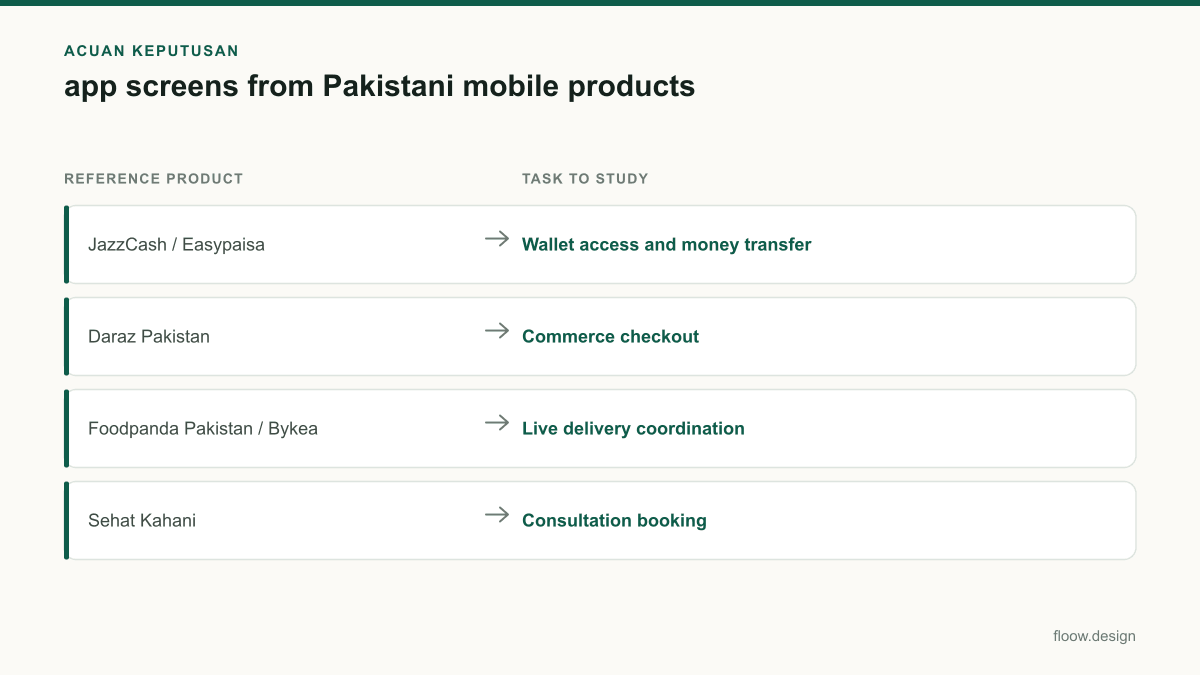
| Reference product | Task to study | Original screens to generate | Local details to include |
|---|---|---|---|
| JazzCash / Easypaisa | Wallet access and money transfer | +92 entry, CNIC verification, recipient, PKR amount, review, receipt | Mobile-wallet transfer; Raast option and transfer states |
| Daraz Pakistan | Commerce checkout | Address, landmark, payment choice, order review, tracking | Cash on Delivery; PKR total; delivery landmark |
| Foodpanda Pakistan / Bykea | Live delivery coordination | Saved address, rider assigned, tracking, contact rider, completion | Landmark visible during handoff; payment and delivery states |
| Sehat Kahani | Consultation booking | Patient details, appointment, payment, consultation preparation, follow-up | English, Roman Urdu, or RTL Urdu treatment when appropriate |
Common mistakes
Showing a generic international phone field that makes users choose Pakistan manually.
Prefill the +92 country code, make the local number format clear, and validate without exposing technical formatting rules.
Treating CNIC verification as a single unexplained camera step.
Add a purpose screen, clear input or capture guidance, consent text where needed, and recoverable error states.
Putting a landmark in an optional note that disappears after checkout.
Make the landmark a first-class address detail and repeat it on the rider-contact and tracking screens.
Showing cash on delivery only at checkout.
Carry the selected COD state through review, confirmation, and the out-for-delivery handoff.
Frequently asked questions
Where can I find Pakistani app screen examples?
Pakistani app screen examples can be studied through the public products of JazzCash, Easypaisa, Daraz Pakistan, Foodpanda Pakistan, Bykea, and Sehat Kahani. Focus on the task sequence rather than copying layouts: +92 number entry, CNIC verification, PKR payments, cash on delivery, landmark addresses, rider contact, order tracking, and consultation booking.
What app screens does a Pakistani wallet need?
A Pakistani wallet typically needs screens for +92 phone entry, account access, CNIC verification where required, recipient selection, PKR amount entry, mobile-wallet or Raast transfer choice, transfer review, and clear pending, successful, failed, or cancelled receipts. The payment state should be visible independently of any notification or transaction-history screen.
How should a Pakistan delivery app show an address?
A Pakistan delivery app should show recipient name, +92 contact number, locality or street details, map pin when available, and a prominent nearby landmark. Keep the landmark visible in the order review and rider-contact state, because it helps the final handoff. Repeat the cash-on-delivery or prepaid status alongside the delivery tracking state.
Which languages should Pakistani app screens support?
Pakistani app screens should support the languages that match their audience and task, commonly English, Urdu, and sometimes Roman Urdu. Use English for familiar product terminology, Roman Urdu for approachable guidance where suitable, and a fully right-to-left Urdu interface for Urdu-first journeys. Urdu support requires RTL navigation, alignment, icon direction, and field behaviour—not translation alone.
Where this leaves you
Choose one reference task from this gallery—such as a Raast transfer receipt, a cash-on-delivery tracking screen, or an Urdu appointment booking flow—and ask floow.design to generate an original, task-specific mobile screen set. Preserve the local task constraints while creating your own information hierarchy, copy, and visual system.
Design the screens first
Describe the app in plain language and floow.design draws the iOS and Android screens for you, ready to refine and hand off.
Sources
Related reading
Design your mobile app with AI.
Generate pixel-perfect iOS and Android screens in seconds, then export to Figma or code.
You might also like…
 Roundups20 September 2026ui design patterns for Pakistani appsExamples of payment, delivery, and booking app screens for Pakistan: PKR balance hierarchy, Urdu-ready typography, status tracking, and clear handoffs.By floow.design Team, Mobile Design
 How-to21 September 2026Splash screen design for Pakistani mobile appsDesign a fast Android-first splash screen for Pakistani apps: bilingual Urdu-English lockups, offline launch assets and clear startup handoff.By floow.design Team, Mobile Design
 Guides21 September 2026Onboarding screen ideas for Pakistani walletsDesign wallet onboarding for Pakistan: explain transfers and Raast first, then hand users to a separate CNIC and regulated KYC journey.By floow.design Team, Mobile Design