
Dashboard design for Pakistani fintech apps
Design a Pakistani fintech dashboard around PKR balances, Raast transfers, bill payments, wallet limits and verification alerts users can act on.

Dashboard design for Pakistani fintech apps should put the available PKR balance, send-money action, Raast transfer status and bill payments above secondary insights. Use familiar amounts such as Rs 25,000, show a Raast ID where relevant, and surface verification or transaction-limit alerts before a customer’s branchless-wallet task is blocked.
Key takeaways
- •Make the balance and the next money-moving action the first decision area on a wallet dashboard.
- •Treat Raast as an instant-payment flow with visible recipient, amount and confirmation state—not as a generic transfer card.
- •Use PKR conventions consistently: Rs 25,000 for whole amounts and Rs 1,250.50 when decimals matter.
- •Prioritise customer due-diligence, verification and transaction-limit alerts because they can directly affect branchless-banking use.
What's on this page
- •Build the first screen around money available and money to do
- •Make the wallet dashboard explain transfer state, not merely list transfers
- •Format PKR for scanning on a small screen
- •Turn verification and limits into timely wallet alerts
- •A practical screen recipe for floow.design
Build the first screen around money available and money to do
A Pakistani fintech dashboard UI should answer three questions before it offers analytics: how much can I use, who can I pay, and what needs attention? Start with a prominent available balance such as Rs 25,000, followed by short actions: Send money, Raast, Pay bills and Add money. Keep account number and balance visibility under an eye-control where the product’s privacy model calls for it.
The next card should be task-led, not a generic chart. A bill-payment card can say “Electricity bill due” with the biller, due date and payable amount; a transfer card can resume a pending action. Spending summaries belong below these actions, expressed in PKR and tied to useful categories or recent transactions.
JazzCash and Easypaisa are both major Pakistani wallet references, but do not copy either screen wholesale. Compare their live balance and transaction areas to understand how each groups common wallet actions and recent activity, then test whether your users need transfers, bills or cash-related tasks first. Their official product surfaces position money transfer and bill payment as core wallet jobs.JazzCash Easypaisa
Make the wallet dashboard explain transfer state, not merely list transfers
A wallet dashboard needs a recent-activity module that makes the outcome of every transfer legible. For Raast, show the recipient name, destination method, amount, timestamp and a clear state: Successful, Pending or Failed. A successful confirmation should explicitly say the payment was sent instantly when the scheme response confirms it; a pending state must say that confirmation is still awaited and offer a receipt or status refresh; a failed state should explain that funds were not sent or that the transfer could not be completed, without implying a debit outcome you cannot verify.
Place the Raast ID in recipient selection, saved beneficiaries and the transfer receipt. Do not bury it in profile settings alone: it is a usable payment address. On the dashboard itself, show status in the recent-transfer row and elevate unresolved pending or failed transfers into an alert card only when action is needed.
Raast is the State Bank of Pakistan’s instant-payment system, so its identity and confirmation language should remain distinct from internal-wallet transfers.State Bank of Pakistan — Raast
Format PKR for scanning on a small screen
Use Rs before amounts in primary mobile UI: Rs 25,000, Rs 1,250.50, and Rs 0. Apply comma grouping for thousands and retain two decimal places only where the underlying payable or transaction value needs them. For a balance, avoid visual noise from unnecessary decimals; for a bill, receipt or fee breakdown, preserve the exact amount. Keep the currency label and figure together so a cropped notification or a quick glance cannot detach the unit from the value.
Give amounts a stable visual hierarchy. The available balance is largest; bill totals and transfer amounts are next; fees, discounts and running totals are smaller but never hidden. Use labels such as “Available balance”, “Amount sent” and “Bill payable” rather than relying on colour alone. In transaction rows, pair a signed amount with a plain-language direction: “Sent to”, “Received from” or “Paid to”.
For a banking app dashboard, do not present every account total as spendable. Label balances by account or wallet type and reserve “available” for the amount the customer can actually use. This avoids a costly mistake when holds, limits or pending payments affect access.
Turn verification and limits into timely wallet alerts
Branchless-banking dashboards in Pakistan should make eligibility visible before the user reaches a blocked transaction. The State Bank of Pakistan’s branchless-banking framework includes customer due diligence and tiered or risk-based account controls; this makes verification state and applicable transaction limits operational information, not back-office detail.State Bank of Pakistan — Branchless Banking
Use a compact alert beneath the balance when it affects the next likely task: “Complete verification to continue using higher wallet limits” is more useful than a vague “Profile incomplete.” If a user approaches a relevant limit, show the amount already used, the remaining permitted amount where your product can calculate it accurately, the reset period where applicable, and a route to the required verification step. Never invent a remaining limit or promise an upgrade outcome.
Keep alert severity proportional. A reminder can live in the profile area; an imminent restriction deserves dashboard placement; a transaction already blocked needs a direct recovery action and support path. This ordering protects the transfer and bill-payment tasks that define everyday wallet use.
A practical screen recipe for floow.design
Generate a PKR wallet dashboard in floow.design, then iterate on balances, Raast transfers and bill-payment cards. Begin with a single-screen mobile brief: a masked wallet balance of Rs 25,000; four actions for Send money, Raast, Pay bills and Add money; one Raast card showing a recipient’s Raast ID and a Successful, Pending or Failed confirmation state; a bill card with Rs 1,250.50 payable; and a verification alert that explains a transaction-limit consequence.
In the first iteration, test information order: balance, actions, urgent status, bills, then transactions. In the second, test whether a pending Raast transfer needs an alert-card treatment or can remain in activity. In the third, vary bill-card prominence based on due date and unpaid state.
Ask for copy that names the outcome, not just the feature: “Raast payment successful” is clearer than “Transfer update.” Keep the screen native to a mobile wallet: thumb-reachable actions, one-tap receipts and no desktop-style financial table squeezed into the viewport.
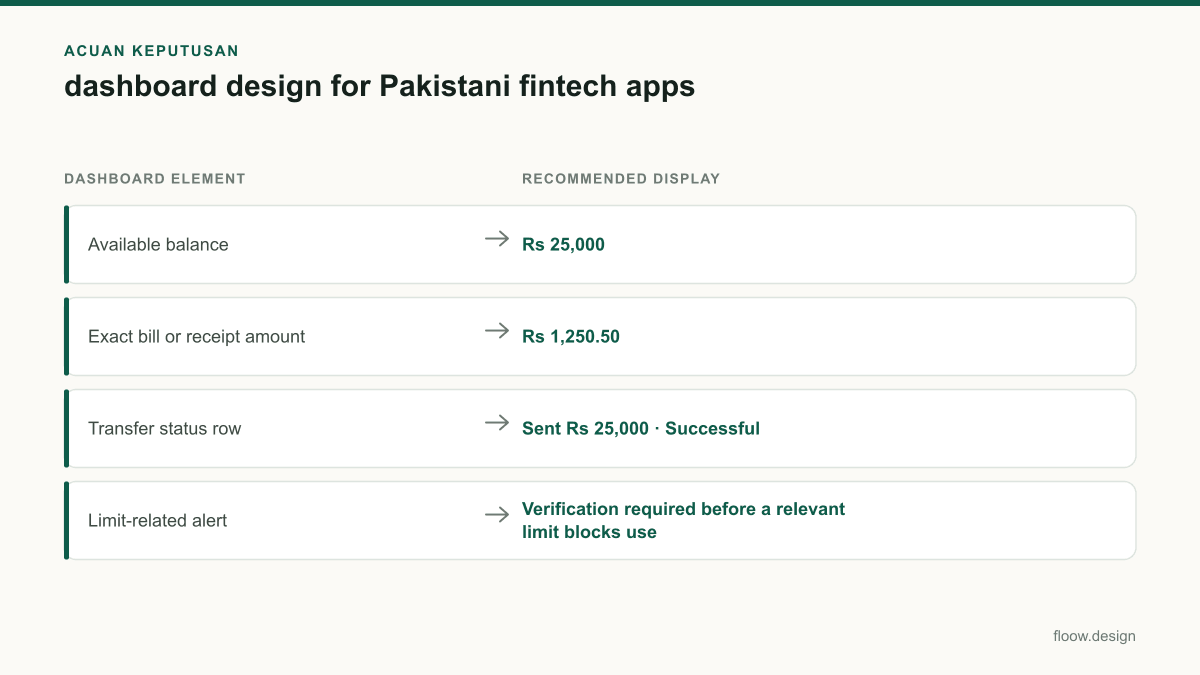
PKR amount treatment for a Pakistani mobile wallet
| Dashboard element | Recommended display | Why it helps |
|---|---|---|
| Available balance | Rs 25,000 | Fast scanning without unnecessary decimals. |
| Exact bill or receipt amount | Rs 1,250.50 | Preserves the payable or recorded value. |
| Transfer status row | Sent Rs 25,000 · Successful | Pairs the monetary outcome with its confirmation state. |
| Limit-related alert | Verification required before a relevant limit blocks use | Explains the next action without displaying an unverified calculation. |
Common mistakes
Putting charts ahead of Send money, Raast and Pay bills.
Place available balance and high-frequency wallet actions at the top; move trend views below task cards.
Showing a generic “completed” label for every payment rail.
Name Raast explicitly and show Successful, Pending or Failed with recipient, amount and receipt access.
Formatting every PKR value with .00.
Use Rs 25,000 for ordinary balance views; retain decimals such as Rs 1,250.50 for exact bills and receipts.
Hiding due-diligence or transaction-limit issues in profile settings.
Surface a timely dashboard alert when verification or a limit can interrupt a likely payment or transfer.
Frequently asked questions
What should a fintech dashboard design show in Pakistan?
A fintech dashboard design in Pakistan should show the available PKR balance, quick actions for sending money and paying bills, recent transfer outcomes, and alerts that affect wallet use. Include Raast access and status where the app supports Raast, plus clear verification or transaction-limit messaging for branchless-banking customers.
How should PKR amounts be formatted in a mobile dashboard?
Format PKR amounts with Rs before the number and comma grouping for thousands: Rs 25,000. Show decimals when an exact bill, fee or receipt requires them, for example Rs 1,250.50. Keep the currency marker attached to the amount, and label whether a figure is an available balance, amount sent or bill payable.
How do JazzCash and Easypaisa dashboard patterns differ?
JazzCash and Easypaisa should be compared through their current wallet balance, action shortcuts and transaction-activity patterns rather than copied as fixed templates. Both support core wallet jobs such as money transfer and bill payment, but a new app should validate which action its own Pakistani customers use first and organise the dashboard around that task.
Where should Raast transfer status appear in an app?
Raast transfer status should appear immediately on the confirmation screen and in the recent-activity row for that payment. Show the recipient, Raast ID or destination context, PKR amount, timestamp and a clear Successful, Pending or Failed state. Elevate pending or failed transfers to a dashboard alert only when the customer needs to act.
Where this leaves you
The strongest Pakistani wallet dashboards reduce uncertainty at the exact moments customers move money: what is available, whether a Raast payment succeeded, what bill is due, and whether verification or a limit will interrupt the task. Use floow.design to generate the first PKR wallet screen, then refine those decision points with real task testing.
Design the screens first
Describe the app in plain language and floow.design draws the iOS and Android screens for you, ready to refine and hand off.
Sources
- •State Bank of Pakistan — Raast
- •State Bank of Pakistan — official site and branchless-banking materials
- •JazzCash — official site
- •Easypaisa — official site
Related reading
Design your mobile app with AI.
Generate pixel-perfect iOS and Android screens in seconds, then export to Figma or code.
You might also like…
 Guides21 September 2026Onboarding screen ideas for Pakistani walletsDesign wallet onboarding for Pakistan: explain transfers and Raast first, then hand users to a separate CNIC and regulated KYC journey.By floow.design Team, Mobile Design
 Guides21 September 2026app navigation for Pakistani commerce appsDesign app navigation for Pakistani commerce apps: categories, cash-on-delivery orders, Urdu labels, rider support and trackable delivery states.By floow.design Team, Mobile Design
 Guides20 September 2026ux design research for Pakistani mobile appsPlan ux design research for Pakistani mobile apps: recruit across provinces, test Urdu and English, and validate shared-device and cash flows with users.By floow.design Team, Mobile Design