
Form design for Pakistani payment apps
Build mobile payment forms for Pakistan with CNIC masks, +92 and 03xx phone handling, PKR amounts, and Raast, JazzCash, and Easypaisa choices.

Form design for Pakistani payment apps should validate a 13-digit CNIC, accept both +92 and domestic 03xx mobile formats, and format payments in PKR. Put Raast, JazzCash, and Easypaisa in payment selection where supported, then use progressive identity checks for regulated journeys that require customer due diligence under State Bank of Pakistan branchless-banking requirements.
Key takeaways
- •Store CNIC as 13 digits but show the familiar 12345-1234567-1 grouping while the user types.
- •Accept +92 and 03xx phone entry, normalize the value internally, and show one clear example beside the field.
- •Treat PKR amounts as numeric inputs with visible rupee context, sensible limits, and a confirmation step before money moves.
- •Do not make every payment form collect identity data up front; introduce verification where the regulated product flow requires it.
- •Generate validated CNIC, phone, and PKR payment-form screens in floow.design before handing requirements to engineering.
What's on this page
- •Start with the riskiest fields, not the visual style
- •Design CNIC input for recognition and validation
- •Accept both Pakistani phone conventions
- •Make PKR entry and payment choices explicit
- •Place identity checks where the financial journey requires them
Start with the riskiest fields, not the visual style
In Pakistani payment flows, the highest-cost errors usually happen in identity, mobile number, recipient, and amount fields. Design these inputs before polishing cards or illustrations. A useful mobile form UX pattern is one primary task per screen: enter a CNIC, confirm a mobile number, choose a payment rail, then review the PKR amount.
Keep labels persistent above the field rather than relying on placeholder text. State the expected format in helper text, show validation as soon as there is enough input to judge it, and preserve what the person typed after an error. Avoid a generic red message such as “Invalid details.” Say what needs correction: “Enter all 13 CNIC digits” or “Use a Pakistani mobile number starting with 03.”
For transfers, make the final review screen explicit: recipient name, masked account or wallet identifier, selected rail, fees if applicable, and the amount in PKR. This is payment form design for a small screen: reduce ambiguity before the user taps the irreversible action.
Design CNIC input for recognition and validation
A CNIC form validation rule should separate display formatting from stored data. National Database and Registration Authority CNICs contain 13 digits. Users commonly recognise the value as 12345-1234567-1, so let the field insert hyphens as they type or accept pasted values with hyphens and spaces. Store and send a normalized 13-digit value only after removing formatting characters.
Use a numeric keypad. Cap entry at 13 digits, reject letters and extra digits, and validate the length locally before requesting a server check. Do not imply that a correctly shaped number proves identity; format validation only confirms the input structure. If a regulated financial flow requires identity verification, make the verification status and next step clear rather than presenting a format check as approval.
Place the exact example under the label: “CNIC: 12345-1234567-1.” It is more useful than a long explanation. For privacy, do not expose a full CNIC in transfer history, notification previews, or a post-submission confirmation screen.
Accept both Pakistani phone conventions
Pakistani customers may enter a mobile number as a domestic 03xx number or in international form beginning +92. A payment app should support both rather than forcing users to mentally convert a familiar number. Provide a country selector defaulted to Pakistan when the product is Pakistan-only, and show a single field example such as 03xx xxx xxxx or +92 3xx xxx xxxx.
Normalize accepted input before lookup or verification: strip spaces, hyphens, and parentheses; preserve the meaningful country and subscriber digits in one canonical format. If the user enters 03xx, do not display an error merely because the backend expects +92; convert it after clear, predictable rules. Conversely, do not silently turn an unrelated international number into a Pakistani one.
Use OTP screens carefully. Display the destination in a masked form, offer a visible edit action, and delay resend until the user can reasonably receive the code. This protects against a common mobile form UX failure: users discover a mistyped number only after leaving the entry screen.
Make PKR entry and payment choices explicit
A PKR amount field needs a numeric keypad, a persistent PKR or Rs currency label, and grouping that improves scanning after entry. Do not use the currency symbol as the only signal: label the field “Amount (PKR)” and show the formatted result on review. Decide whether your product permits decimal amounts, then enforce that rule consistently; do not let one screen accept decimals and another reject them without explanation.
For a checkout or transfer form, show only payment choices that the merchant or product can actually process. Relevant Pakistan options can include Raast, JazzCash, and Easypaisa. Describe each choice in the user’s task language—for example, wallet payment or bank transfer—rather than assuming people know the underlying rail. After selection, reveal only the fields required for that method.
Keep the confirmation action separate from amount entry. A review screen should repeat the recipient or merchant, payment method, and final PKR amount. This catches digit errors and wrong-rail selections before funds are sent.
Place identity checks where the financial journey requires them
Identity collection should be tied to a real regulated purpose, not used as a default obstacle on every first screen. State Bank of Pakistan branchless-banking requirements include identity verification and customer due diligence obligations for regulated financial journeys. Product, compliance, and engineering teams should map the relevant journey—such as wallet onboarding or an account-linked financial service—to the applicable verification requirement before finalizing the screens.
In the interface, explain why the person is being asked for a CNIC and what happens next. Break the process into short steps: CNIC entry, any required details, verification status, and a recoverable route if verification cannot be completed. Avoid requesting the same identity data again after it has been verified unless the journey genuinely needs reconfirmation.
A good payment form design also separates verification from authorization. “Your identity details were received” is not the same as “Your payment was sent.” Give each state its own screen, status language, and support path. Generate these validated CNIC, phone, and PKR payment-form screens in floow.design before handing requirements to engineering.
Pakistan-specific input rules for mobile payment forms
| Field | What users may enter | Interface handling |
|---|---|---|
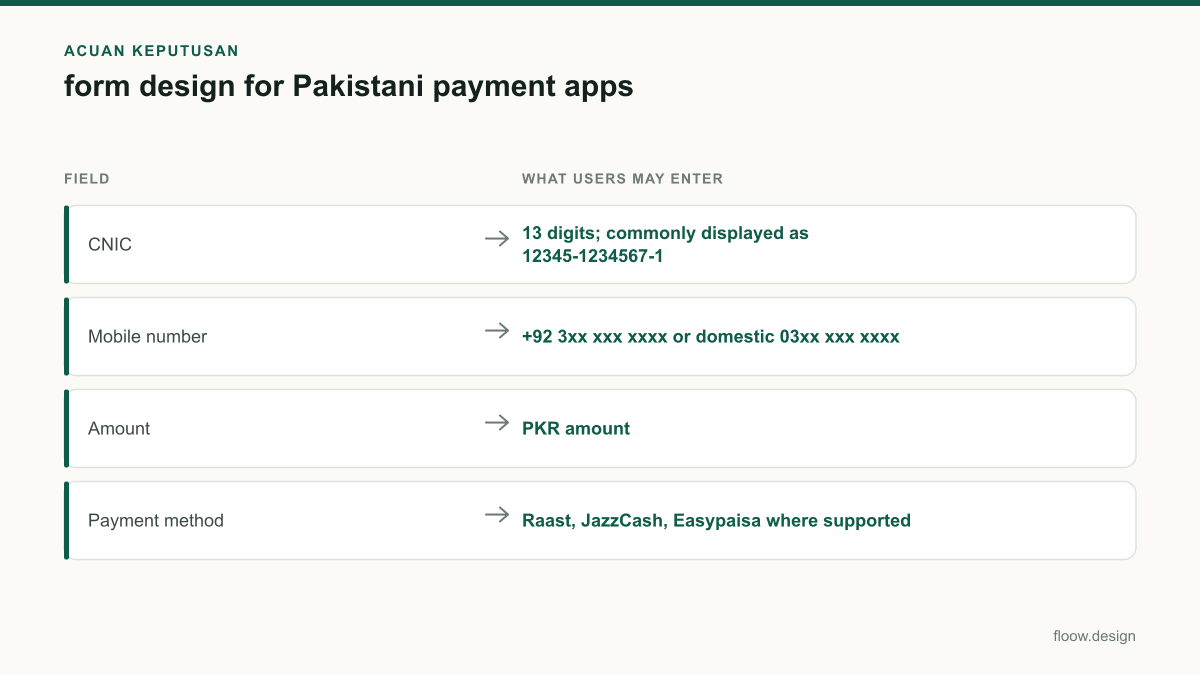
| CNIC | 13 digits; commonly displayed as 12345-1234567-1 | Mask for readability, accept formatted paste, normalize to 13 digits, and validate length locally. |
| Mobile number | +92 3xx xxx xxxx or domestic 03xx xxx xxxx | Accept both forms, remove visual separators, and normalize before OTP or account lookup. |
| Amount | PKR amount | Use numeric entry, show PKR persistently, format for review, and confirm before payment. |
| Payment method | Raast, JazzCash, Easypaisa where supported | Show only available methods and reveal method-specific fields after selection. |
Common mistakes
Using one unformatted text field for CNIC.
Use a numeric input with the familiar 12345-1234567-1 display grouping, while storing a normalized 13-digit value.
Rejecting a valid domestic 03xx number because the service stores +92.
Accept both Pakistani entry conventions and normalize them before verification or lookup.
Putting currency only in a placeholder.
Keep PKR visible in the field label or prefix and repeat the formatted amount on the review screen.
Showing every possible payment method regardless of availability.
Show Raast, JazzCash, Easypaisa, and other methods only when the current merchant or journey supports them.
Frequently asked questions
How should a CNIC field be formatted in a mobile form?
A Pakistani mobile form should accept a CNIC as 13 digits and display it in the familiar 12345-1234567-1 grouping. Use a numeric keypad, automatically add hyphens or accept pasted hyphens, and normalize the saved value to 13 digits. A format match is not identity proof; regulated verification must be handled as a separate status.
Should a Pakistani app ask for +92 or 03xx phone numbers?
A Pakistani app should accept both +92 3xx xxx xxxx and domestic 03xx xxx xxxx mobile-number formats. Show one clear example, remove spaces and hyphens during processing, and normalize the accepted number for OTP delivery or account lookup. Do not reject a domestic 03xx number solely because internal systems use +92.
How do I design a PKR amount input?
Design a PKR amount input with a numeric keypad, a persistent “Amount (PKR)” label or currency prefix, and readable grouping after entry. Apply the product’s decimal and transaction-limit rules consistently, then show the recipient, chosen payment method, and final PKR amount on a separate confirmation screen before funds move.
What payment options should a Pakistan checkout form show?
A Pakistan checkout form should show payment methods the merchant can actually accept, which may include Raast, JazzCash, and Easypaisa. Label each option by the customer task, reveal only the fields needed after selection, and confirm the selected method with the final PKR amount before payment. Avoid presenting unavailable options as disabled clutter.
Where this leaves you
The safest Pakistani payment forms make local formats feel familiar while keeping validation precise: 13-digit CNICs with visible grouping, +92 and 03xx mobile support, PKR-first amount entry, and payment rails that match the transaction. Build and test these states in floow.design, including errors, verification, and payment review, before engineering implementation.
Design the screens first
Describe the app in plain language and floow.design draws the iOS and Android screens for you, ready to refine and hand off.
Sources
- •State Bank of Pakistan
- •National Database and Registration Authority
- •Raast — State Bank of Pakistan
- •JazzCash
- •Easypaisa
Related reading
Design your mobile app with AI.
Generate pixel-perfect iOS and Android screens in seconds, then export to Figma or code.
You might also like…
 How-to21 September 2026Splash screen design for Pakistani mobile appsDesign a fast Android-first splash screen for Pakistani apps: bilingual Urdu-English lockups, offline launch assets and clear startup handoff.By floow.design Team, Mobile Design
 How-to21 September 2026Login screen design for Pakistani appsDesign a trusted Pakistani mobile login UI with +92 and 03xx handling, resilient SMS OTP states, privacy controls and finance-ready security paths.By floow.design Team, Mobile Design
 How-to20 September 2026Wireframe a Pakistani mobile payment flowLearn how to wireframe Pakistani transfer, cash-out and bill-payment screens with Raast IDs, wallet choices, error states and local user personas.By floow.design Team, Mobile Design