
figma tutorial for Pakistani mobile app flows
Learn a figma tutorial for Pakistani bilingual payment and booking flows: Urdu RTL layouts, +92 sign-up, reusable PKR price components, and prototypes.

This figma tutorial builds a Pakistani bilingual booking and payment flow: create English and Urdu screen variants, account for Urdu right-to-left layout, validate a +92 phone-number entry pattern, and reuse PKR currency formatting through a price component. Start with a generated first-screen direction in floow.design, then refine the selected direction and prototype in Figma.
Key takeaways
- •Use one shared mobile flow structure, with language-specific layout rules rather than simply translating English labels.
- •Treat +92 phone input and PKR amount display as reusable components with clear states.
- •Prototype the complete path from booking selection through payment review and confirmation before polishing every screen.
- •Generate early visual directions in floow.design; use Figma for component construction, variants, and interaction detail.
What's on this page
- •Set up the Pakistan-specific flow before drawing screens
- •Build bilingual layouts with intentional RTL rules
- •Make +92 and PKR reusable parts of the design system
- •Prototype decisions, errors, and the final handoff
Set up the Pakistan-specific flow before drawing screens
Use a realistic task rather than a generic checkout: booking an appointment, selecting a time slot, entering a phone number, and reviewing a payment in PKR. This gives the file decisions that matter in a Pakistani app flow.
Map the core path as Browse → Select service → Choose slot → Enter number → Review → Pay → Confirmation. Add a language switch at an intentional point, such as the first screen or profile settings. Do not assume the Urdu version is only an English screen with different strings: Urdu interfaces require right-to-left layout considerations, including alignment, reading order, icon direction, and the placement of leading and trailing actions.
Create a page for flow maps, a page for foundations, and a page for production screens. Name frames by task and state, such as Booking / Review / Urdu and Payment / Error / English. This makes prototype links understandable when the flow grows. For the initial visual route, generate a first-screen direction in floow.design. Pick the direction that fits the service and audience, then bring that decision into Figma instead of beginning with an empty canvas.
Build bilingual layouts with intentional RTL rules
Start with a compact foundation: spacing tokens, text styles, semantic colours, radius, fields, buttons, and navigation. Then decide which components mirror in Urdu and which retain a fixed order. In most app interfaces, back arrows, chevrons, progress direction, text alignment, and leading icons need an RTL review. Avoid manually moving layers screen by screen; use Auto Layout, logical component structure, and variants so the layout can be checked consistently.
For each key screen, make English and Urdu variants. In the Urdu variant, test long labels, mixed scripts, numerals, and punctuation. A card with a service name, a date, and a price is especially useful because it reveals whether the hierarchy still reads correctly. Keep numbers legible and visually stable, but validate their placement in surrounding right-to-left content.
Make a Language=English/Urdu property where structure genuinely changes. If only the copy changes, use a content-ready duplicate or a documented replacement process. The goal is not automatic translation; it is a layout that preserves scanning order and action clarity for both languages.
Make +92 and PKR reusable parts of the design system
Create a phone-field component with a country selector, a fixed +92 prefix state, an editable national-number area, focus styling, validation messaging, and a disabled state. Pakistani phone numbers use the +92 country code, so show it as a deliberate part of the entry pattern instead of leaving an ambiguous blank international field. Test the screen with the keyboard open: the primary action must remain visible and the field label must not be hidden.
PKR currency formatting should be designed as a reusable component. Build a Money component or text style pattern with properties for amount emphasis and context: list price, fee, discount, total, and refund. Use the same rule on service cards, review rows, payment buttons, and confirmation receipts. This prevents a common inconsistency where one screen uses PKR, another uses Rs, and totals have different weight or grouping.
For a booking review, show the service, date and time, subtotal, any clearly labelled fee, and final payable amount. Keep the total visually dominant, but do not make the payment button repeat an amount that can change without connecting it to the same component logic.
Prototype decisions, errors, and the final handoff
Prototype the actions a user must understand: choosing a service, changing a time, entering a +92 number, switching language, proceeding to payment, and seeing success or failure. Use interactive component variants for selected slots, field focus, invalid phone input, loading, and payment status. This is more useful than linking only happy-path screens with dissolve transitions.
For Urdu testing, run the prototype from an Urdu screen rather than jumping into a translated review page. Check that back navigation, progress indicators, confirmation copy, and directional icons make sense from right to left. For payment review, test a changed total and an unavailable slot so the user sees why an action cannot continue.
Hand the work off with a short Figma page containing component usage notes, prototype entry points, and unresolved content questions. floow.design is best used at the beginning to generate screen directions quickly; Figma is where the selected direction becomes a maintainable design system and a testable mobile prototype. Export only the assets developers need, and keep behaviour notes beside states that are not obvious from the static frame.
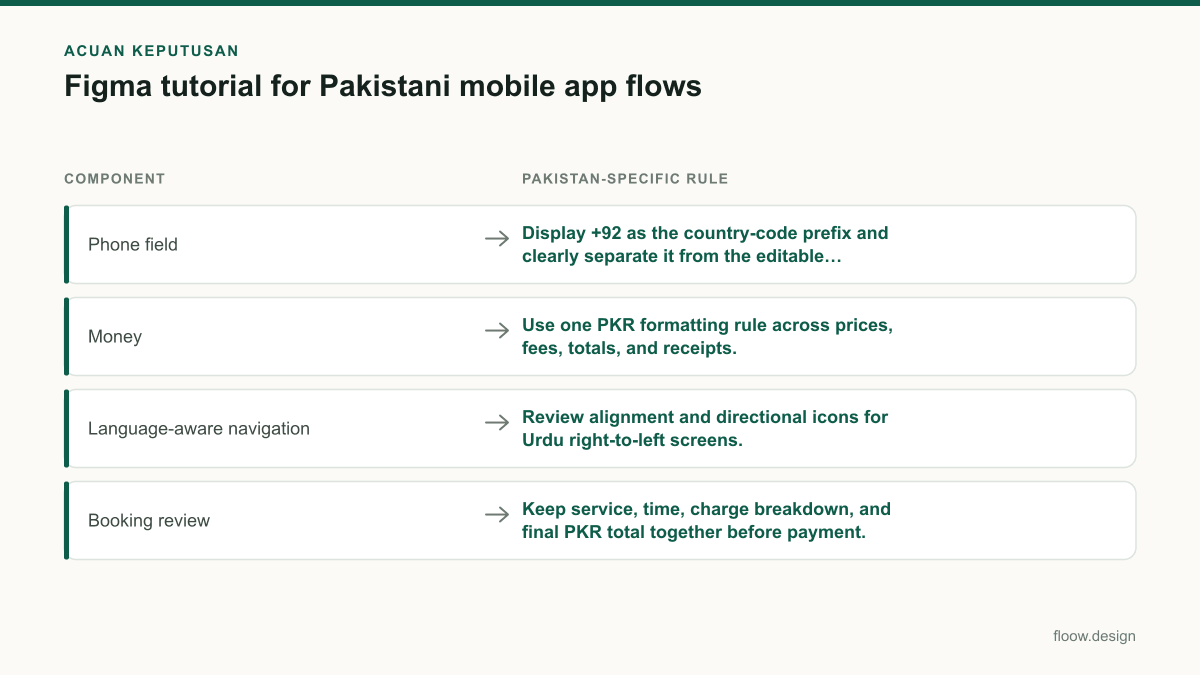
Reusable component decisions for a Pakistani bilingual booking flow
| Component | Pakistan-specific rule | Useful variants |
|---|---|---|
| Phone field | Display +92 as the country-code prefix and clearly separate it from the editable number. | Default; focused; invalid; completed; disabled |
| Money | Use one PKR formatting rule across prices, fees, totals, and receipts. | Regular; discounted; total; refund |
| Language-aware navigation | Review alignment and directional icons for Urdu right-to-left screens. | English LTR; Urdu RTL |
| Booking review | Keep service, time, charge breakdown, and final PKR total together before payment. | Default; slot changed; payment unavailable |
Common mistakes
Translating English labels into Urdu while keeping every icon, alignment, and navigation cue left-to-right.
Create and review Urdu variants with right-to-left reading order, including back arrows, chevrons, leading actions, and text alignment.
Using a plain text layer for every price amount.
Create a reusable PKR money component with consistent hierarchy for list prices, fees, discounts, totals, and refunds.
Accepting an unformatted phone field with no country context.
Provide a +92 prefix pattern, clear validation states, and keyboard-tested placement for the submit action.
Using floow.design as the final production file.
Use floow.design to choose an initial screen direction, then construct components, variants, documentation, and prototype interactions in Figma.
Frequently asked questions
How do I make a Pakistan mobile app in Figma?
Make a Pakistan mobile app in Figma by mapping a real local task, such as booking and paying for a service, then building reusable phone, money, and navigation components. Include a +92 phone-number pattern, use a reusable PKR formatting component, and create English and Urdu variants. Review Urdu screens for right-to-left layout, not just translated text.
How do I design Urdu screens in Figma?
Design Urdu screens in Figma by treating them as right-to-left interface variants. Review text alignment, reading order, back arrows, chevrons, leading icons, progress direction, mixed Urdu-and-number content, and long labels. Use Auto Layout and component variants so RTL adjustments are systematic. Test the Urdu prototype from its first screen through confirmation, rather than checking isolated translated frames.
How do I prototype a PKR payment flow?
Prototype a PKR payment flow by linking service selection, booking review, payment, and confirmation states in Figma. Create a reusable PKR money component for prices, fees, discounts, totals, and refunds, then use it consistently in each screen. Include interaction states for an edited booking, invalid phone input, loading, payment failure, and a successful receipt.
When should I use floow.design instead of Figma?
Use floow.design first when you need several credible mobile screen directions for a Pakistani booking or payment flow. Select the direction that best supports the task, then move into Figma to refine spacing, build English and Urdu variants, define the PKR and +92 components, and connect a detailed prototype. Figma remains the working file for design-system maintenance and handoff.
Where this leaves you
A useful Pakistani mobile flow is built from local interface decisions, not a translated template. Generate the first visual direction in floow.design, then use Figma to turn it into bilingual RTL-aware screens, reusable +92 and PKR components, and a prototype that covers both payment success and failure.
Design the screens first
Describe the app in plain language and floow.design draws the iOS and Android screens for you, ready to refine and hand off.
Sources
- •International Telecommunication Union — country calling codes
- •State Bank of Pakistan — official central bank and currency information
- •Unicode Consortium — bidirectional and right-to-left text resources
- •Figma — official product and help resources
Related reading
Design your mobile app with AI.
Generate pixel-perfect iOS and Android screens in seconds, then export to Figma or code.
You might also like…
 How-to20 September 2026User interface design for Pakistani mobile appsPractical user interface design rules for Pakistani mobile apps: CNIC inputs, +92 phone numbers, PKR pricing, Urdu support, and confirmation states.By floow.design Team, Mobile Design
 Insights20 September 2026ui ux designer role in Pakistan mobile teamsA practical career guide to UI/UX designer deliverables, design systems, prototypes, handoff, and team habits for Pakistan mobile products.By floow.design Team, Mobile Design
 How-to20 September 2026Prototype a Pakistan mobile app before buildingPrototype Pakistan app flows for trust, address entry, CNIC context and cash on delivery, then run focused usability testing before development.By floow.design Team, Mobile Design